
Every DartsOn setting explained
A guide to each row in the DartsOn Settings tab, in the app's order, with what it changes and where to read more.
The Settings tab holds everything you can change in DartsOn. This page goes through it from top to bottom, in the order the app shows it, with a line or two on each row and a link to the full article.
Some rows only appear in certain cases, such as when you’re signed in or on iPhone. The tables say when.
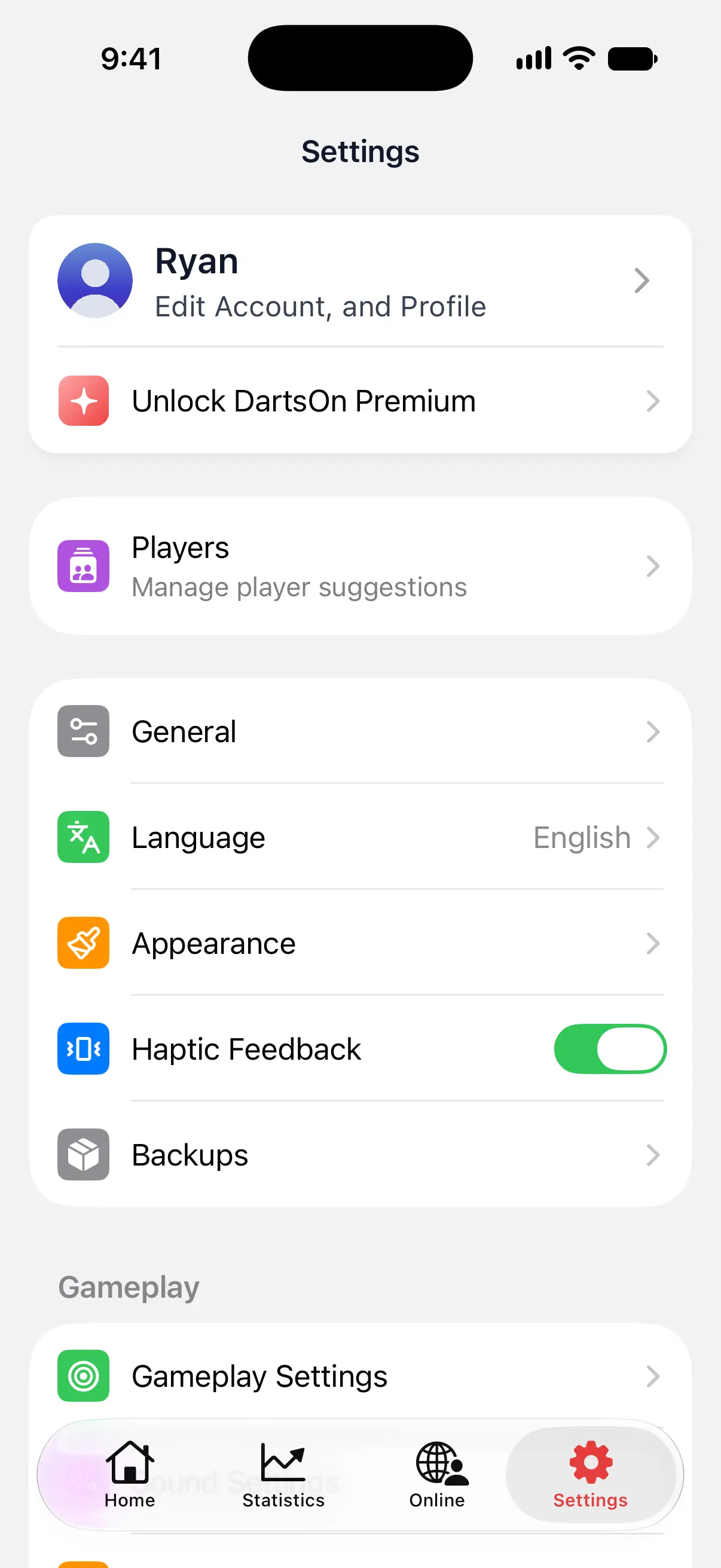

Account, Premium and Ultra
| Row | What it does |
|---|---|
| DartsOn Account, or your name | Signed out, the row is DartsOn Account, with Sign in or create an account. under it. Tap it to sign in. See create an account. Signed in, the same row shows your name and photo with Edit Account, and Profile, and opens your profile. While sync has something to report, its status takes the place of that line. See your profile and sync. |
| Unlock DartsOn Premium | Opens the Premium and Ultra plans. With a plan and signed in, the row is hidden. With a plan and signed out, it reads DartsOn Premium Unlocked or DartsOn Ultra Unlocked. With Premium, it may read Upgrade to DartsOn Ultra and open the Ultra plans. See Premium and Ultra. |
Players
| Row | What it does |
|---|---|
| Players | Your saved players, the ones DartsOn suggests when you set up a game. Add, rename or delete them, and mark which one is you. See manage players. |
General, language and appearance
| Row | What it does |
|---|---|
| General | Online Play, notifications, privacy and data sharing. See inside General below. |
| Language | Shows DartsOn’s current language. Tap it, then Open Settings to change the language in your device’s settings for DartsOn. See language. |
| Appearance | Light or dark mode, High Contrast, the App Theme color and the App Icon. See appearance. |
| Haptic Feedback | Turns DartsOn’s vibrations on or off. It starts on for iPhone and iPad, and off on a new Android install. See sounds and haptics. |
| Backups | Create and restore backups on iPhone and iPad, or export and import a backup file on Android. To restore or import one, sign out first. See backups. |
Inside General
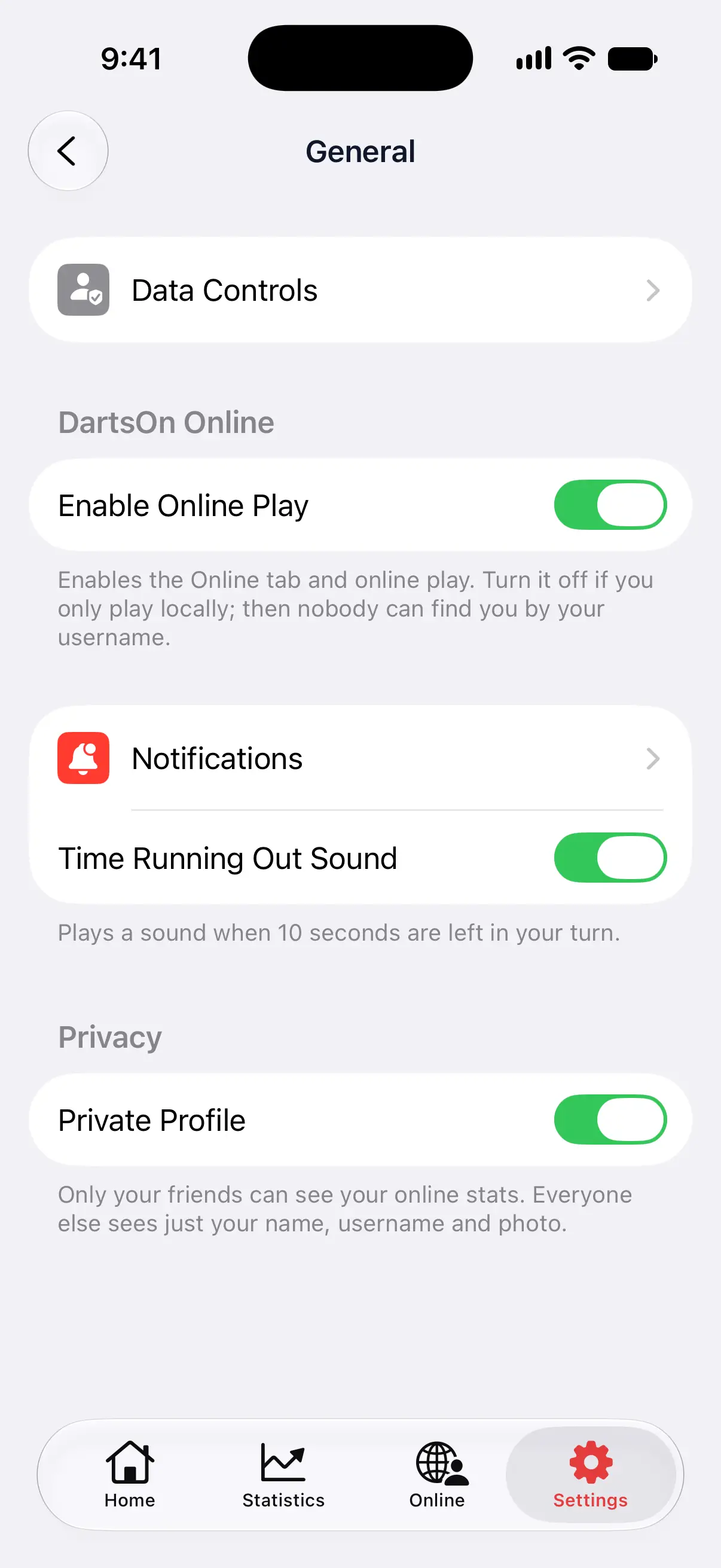
| Row | What it does |
|---|---|
| Data Controls | Holds Improve auto-scoring model. When it’s on, DartsOn may share camera frames when you report or correct a camera-scored dart, to improve Auto-Scoring. It never collects frames during normal play. See improve auto-scoring. |
| Enable Online Play | Under DartsOn Online. Shows the Online tab and lets you play online. Turn it off if you only play locally. Nobody can then find you by your username. See get started online. |
| Notifications | How friends’ match challenges reach you: as a Banner or a Sheet, a Temporary or Persistent banner, with Sounds and Badges switches. Signed in, it also has Challenges While Away. Shown while Online Play is on. See challenges. |
| Time Running Out Sound | Plays a sound when 10 seconds are left in your turn in an online match. Shown while Online Play is on. See turn timer. |
| Private Profile | Under Privacy. Only your friends can see your online stats. Everyone else sees just your name, username and photo. Shown while you’re signed in and Online Play is on. See online stats and profiles. |
| Show Last Online to Friends | Lets friends see when DartsOn was last online. Turn it off to hide that time. See privacy settings. |
| Show Recent Games to Friends | Shows your recent online matches to friends on your Online Profile. Turn it off to hide that list. See privacy settings. |
Gameplay
| Row | What it does |
|---|---|
| Gameplay Settings | Bot speed, automatic turns and legs, checkout and setup suggestions, and your preferred double and custom Checkout Routes. See gameplay settings. |
| Sound Settings | The caller: which voice, what it announces, its volume and speed, player names, checkout and bust callouts, and the sound effects volume. You can also open it from a game’s menu. See caller settings. |
| Auto-Scoring Settings | The scoring model, Energy Mode, model storage and other options for camera auto-scoring. See Auto-Scoring Settings. |
| Voice-Input Settings | Turn on voice input for X01, learn the phrases and practice them. iPhone and iPad only. See voice input. |
Action Replays
| Row | What it does |
|---|---|
| Action Replays | Your library of recorded turns, the Enable Action Replays switch, Manage Storage for the space replays use on this phone and DartsOn Cloud Storage for the replays in your account. See Action Replays. |
Support, community and legal
| Row | What it does |
|---|---|
| Manage Subscription | Your Premium or Ultra subscription, to change or cancel it. Shown while you have a plan. See Premium and Ultra. |
| Share DartsOn | Opens the share sheet with a link to download DartsOn. See share DartsOn. |
| What’s New | The release notes of recent versions. Shown when there are notes to read. See read What’s New. |
| Feedback | Send the DartsOn team a message, with screenshots if you like. See send feedback. |
| Rate App | Opens DartsOn in the App Store or Google Play, where you can write a review. Not always shown. |
| Feature Requests | Ask for a feature, and upvote and comment on other players’ requests. See ask for a feature. |
| Help and Guides | Opens the DartsOn Help Center in the app, with guides to games, scoring, settings and online play. |
| Discord Community | Opens the DartsOn Discord server. See join the community. |
| Reddit Community | Opens the DartsOn subreddit. See join the community. |
| Privacy Policy | Opens the privacy policy. |
| Terms of Service | Opens the terms of service. |
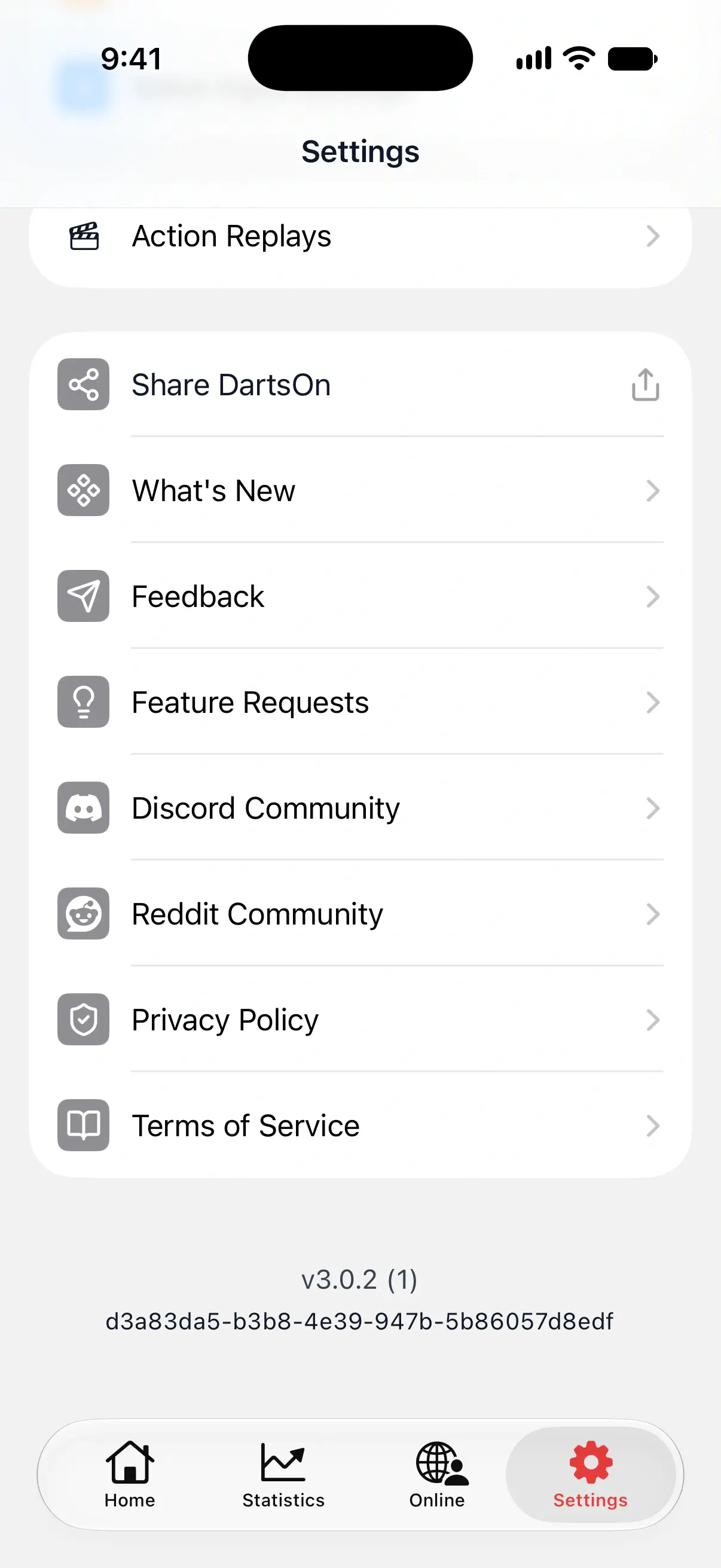
Under the last group, Settings shows the version of DartsOn you’re running, such as v3.1.0 (1), and an ID. If you contact support about a problem, include both.
Questions and answers
Where are the sound and caller settings in DartsOn?
Open Settings and tap Sound Settings under Gameplay. You can also open them from the menu in any game.
How do I hide the Online tab in DartsOn?
Open Settings → General and turn off Enable Online Play. The Online tab disappears, and nobody can find you by your username.
How do I find which version of DartsOn I have?
Scroll to the bottom of Settings. The version number, such as v3.1.0, is under the last group of rows.
Related
- Change DartsOn's dark mode, colors and app icon Switch DartsOn between light and dark mode, turn on High Contrast, and pick the App Theme color and app icon you like. Some colors and icons need Premium.
- DartsOn gameplay settings explained Set how fast bots throw, whether turns and legs move on by themselves, whether checkouts confirm automatically and whether DartsOn suggests checkouts.
- How to set up the DartsOn caller and game sounds Choose what the darts caller announces, set its volume and speed, add player names and checkout callouts, and change bust and game sounds.
- How to change Auto-Scoring Settings in DartsOn Pick the scoring model, set Energy Mode, check how fast auto-scoring runs on your phone and free up space. Every row of Auto-Scoring Settings explained.