
How to enter darts scores in DartsOn
Enter each dart in DartsOn with the keypad or by tapping the dartboard, undo mistakes, use the turn summary and score in landscape or on a tablet.
DartsOn offers 4 ways to enter your darts, and you can switch between them during a game. This page covers the two you tap, the keypad and the dartboard. It also explains undo, the turn summary and how scoring looks in landscape and on a tablet.
Choose how to enter darts
| Input | Games | Good for |
|---|---|---|
| Numeric keypad | All 14 | The quickest way to type in a score |
| Dartboard | X01 and Cricket | Recording where each dart landed, not only its score |
| Auto-Scoring | All 14 | Scoring with your phone’s camera, hands free. Free for a limited number of games, then DartsOn Premium. See set up camera auto-scoring |
| Voice-Input | X01 | Saying each dart out loud, on iPhone and iPad with iOS 26 or later on supported devices. See voice input |
To switch in X01 or Cricket, open the ••• menu at the top right and pick Numeric or Dartboard under Input Mode. DartsOn remembers your choice separately for X01 and Cricket. The camera button next to the menu turns on camera auto-scoring, and picking Numeric or Dartboard turns it off again.
Use the keypad
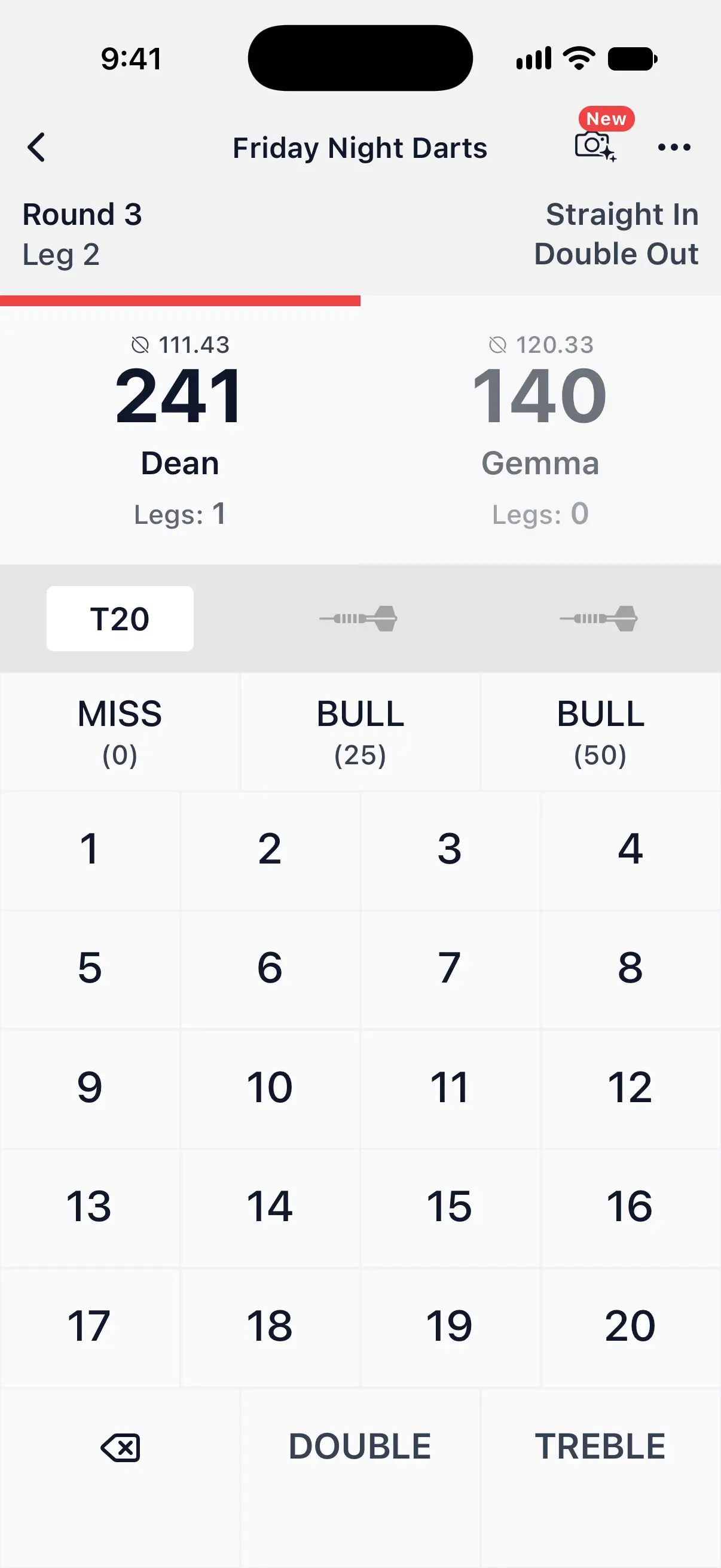
The 3 slots above the keypad show the darts of the current turn.
- A single: tap the number.
- A double or treble: tap DOUBLE or TREBLE first, then the number. The keys change to D or T while one is selected. Tap it again to cancel.
- The bull: the two BULL keys score 25 for the outer bull and 50 for the bullseye. With Fat Bull, both score 50.
- A miss or a bounce-out: tap MISS.
- Undo: the key at the bottom left removes the last dart.

Count Up, Killer, 121 Checkout and Checkout Trainer use the same keypad.
Keypads in the other games
Games with one target per round show keys for that target only, which saves you looking for the right number:
- Around the Clock and Round the World: the current target and MISS. If you turned on Doubles & Trebles in the setup, which lets them skip ahead, the keys are the single, double and treble of the target.
- Shanghai: the single, double and treble of the round’s number, and MISS.
- Half It: the single, double and treble of the round’s number. A doubles or trebles round shows every double or treble, and a bull round shows the two bulls.
- JDC Challenge: the single, double and treble in the Shanghai parts, and the current double and MISS in the doubles part.
- Singles Training: the single, double and treble with the points each scores, and MISS.
- Doubles Training and Bob’s 27: the current double and MISS.
Cricket has a grid with the single, double and treble of each number in play, the two bulls and Miss. That’s 15 to 20 in Standard Cricket and 10 to 20 in Tactics. Random Cricket shows the leg’s numbers, Crazy Cricket the numbers in play this turn, and Hidden Cricket all 20. Tap Next to end your turn before the third dart.
Tap the dartboard
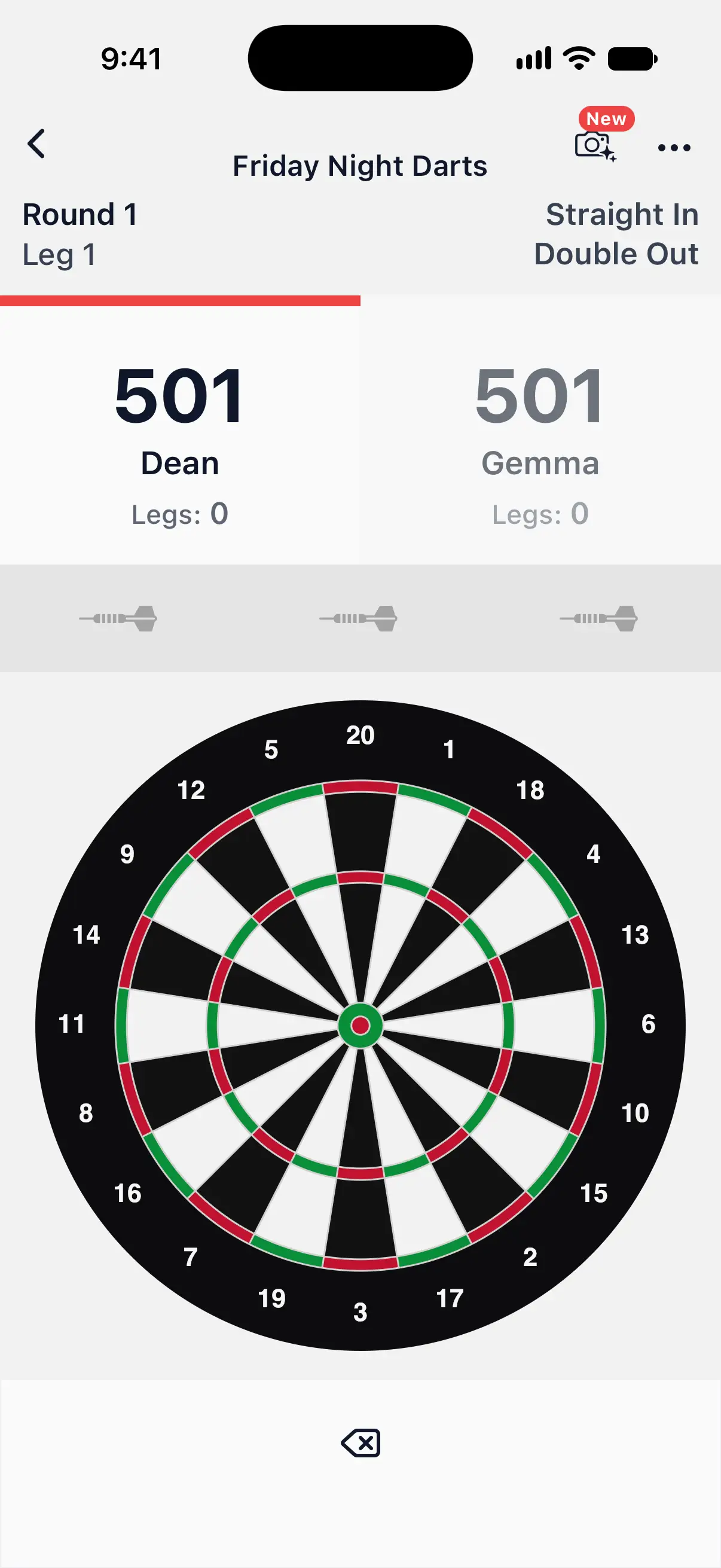
In X01 and Cricket, you can tap where each dart landed instead of typing its score.
Tap the spot on the board where the dart is, and DartsOn enters it. A numbered marker shows each dart of the turn.
For a dart near a wire, place it precisely instead:
- Touch and hold the board. It zooms in, a magnifier in the corner shows the spot under your finger, and a label names the segment.
- Drag to the exact spot.
- Lift your finger to enter the dart.
To enter a miss, tap the outer ring with the numbers, outside the doubles. The undo key below the board removes the last dart.
Undo a dart
Tap the undo key to remove the last dart you entered. Keep tapping to go back into earlier turns of the same leg. Undo never goes back into a leg that has finished.
A bot’s turn is undone in one go. The first tap shows the bot’s turn again for you to check, and the next tap removes it. While a bot is throwing, undo is locked.
The turn summary
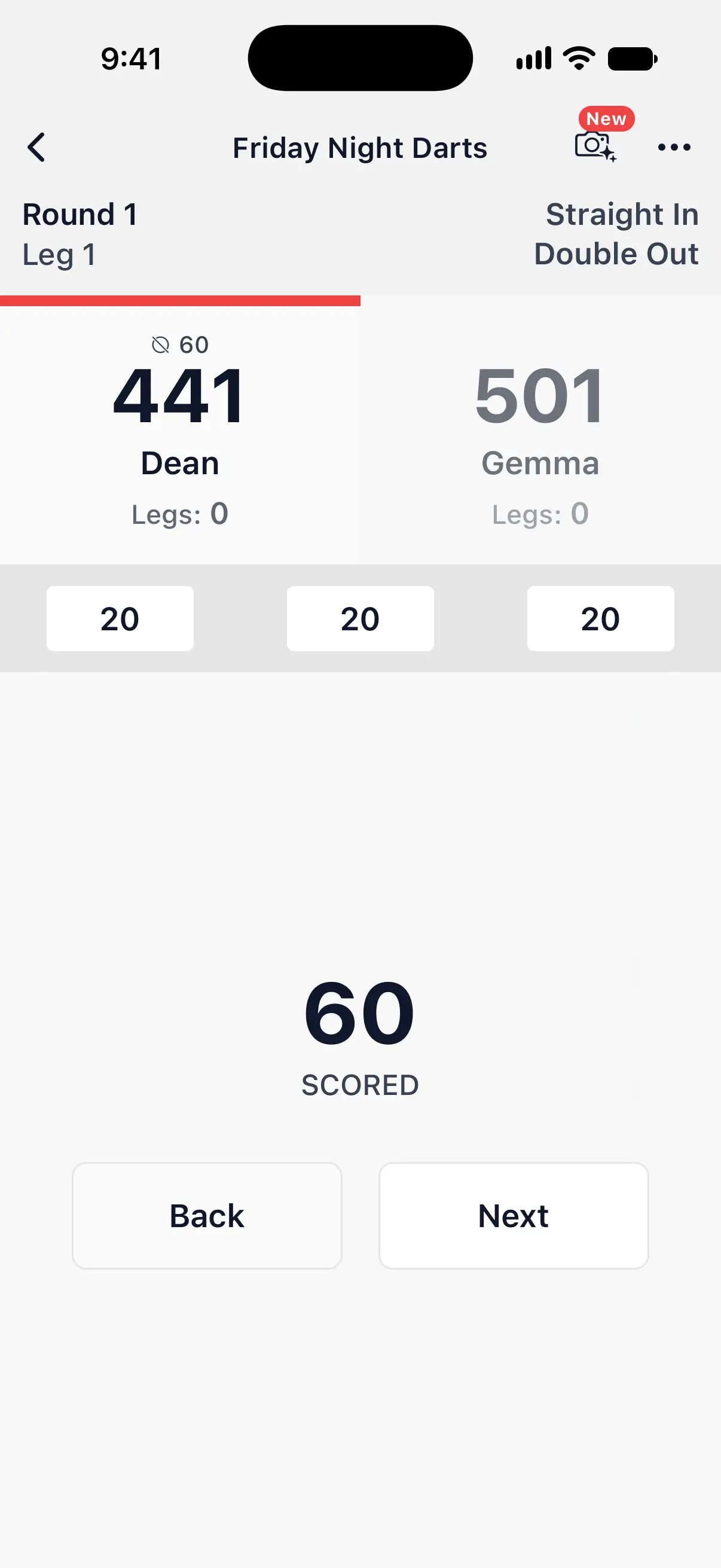
After your third dart, DartsOn shows what the turn scored, such as 60 SCORED. A bust or a checkout gets its own screen.
- Tap Next to hand over to the next player.
- Tap Back to return to the turn and fix a dart.
Auto-advance Turns is on to start with, so Next fills up and moves on by itself after about 3 seconds. Turn it off in Settings → Gameplay Settings if you’d rather tap Next yourself. A checkout waits for you unless you turn on Confirm Checkouts Automatically there too. Bot turns move on by themselves, except one you’re checking after an undo. See gameplay settings.
In X01 with camera auto-scoring, there’s no turn summary. The next turn starts once you’ve pulled your darts from the board.
In Cricket, only bot turns get a summary. For your own turns, with Auto-advance Turns on, the Next button below the grid fills up after your third dart and ends the turn by itself.
If you tap Next in Cricket before entering all 3 darts, the empty slots count as misses. They still count toward your darts thrown and MPR, so enter every dart you actually hit before moving on.
See a player’s rounds in X01
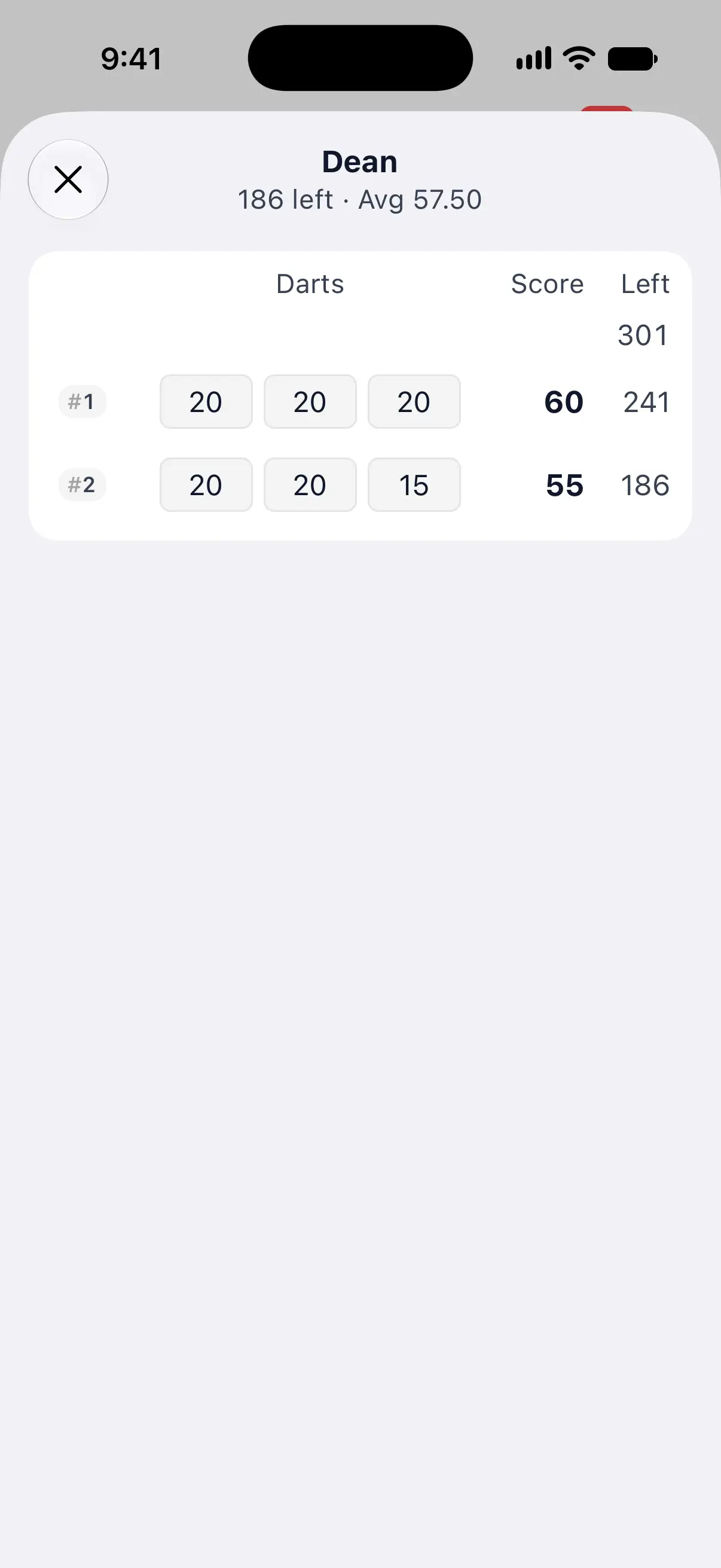
Tap a player’s score in an X01 game to see their rounds in the current leg, with the darts of each turn, what it scored and what was left. The top shows their remaining score and their average.
For every turn of every leg, open Game Info in the ••• menu and tap Turn by Turn. See match history.
Keep the screen on
The screen stays awake while you score X01, Cricket, Count Up, Killer, 121 Checkout or Checkout Trainer, and whenever camera auto-scoring is on, so your phone doesn’t lock between turns. In the other games, your phone’s own auto-lock applies.
Landscape and tablets
Turn your phone sideways for the landscape layout, which shows the active player’s score in large numbers. On a tablet, the keys are larger and the layout uses the wider screen.
Sounds and haptics
DartsOn plays sound effects for game events, such as a dart landing, a miss and the end of a turn. To make them louder or quieter, open Settings → Sound Settings and drag Sound Effects Volume. Drag it all the way down to turn the effects off. You can also open Sound Settings from the ••• menu during a game.
The phone also buzzes lightly as you tap. To turn that off, switch off Haptic Feedback in Settings.
For the caller that announces your scores, see caller settings.
Questions and answers
How do I enter a treble 20 in DartsOn?
Tap TREBLE, then 20. The dart slot shows T20. For a double, tap DOUBLE first in the same way.
How do I fix a dart I entered wrongly?
Tap the undo key to remove the last dart, then enter it again. If the turn summary is already showing, tap Back to return to the turn.
Can I tap the dartboard in Around the Clock or Shanghai?
No. Tapping the dartboard works in X01 and Cricket. The other games use a keypad with the round's target, and every game can use camera auto-scoring.
How do I stop DartsOn moving to the next player by itself?
Open Settings, tap Gameplay Settings and turn off Auto-advance Turns. The turn summary then waits until you tap Next.
Related
- How checkout suggestions work in DartsOn See checkout and setup suggestions in DartsOn. Pick your preferred double, customize routes for each ending rule, or turn suggestions off.
- How to set up camera auto-scoring in DartsOn Place your phone by the board, turn on Auto-Scoring and let the camera score each dart. What you need, where to put the phone and how each turn works.
- How to enter darts by voice in X01 Say each dart instead of tapping it. Turn on Voice-Input on iPhone or iPad, learn what to say, practise and save corrections DartsOn learns from.
- DartsOn gameplay settings explained Set how fast bots throw, whether turns and legs move on by themselves, whether checkouts confirm automatically and whether DartsOn suggests checkouts.