
How to play an online darts match in DartsOn
Score an online darts match with the keypad, dartboard or camera, correct a dart, reconnect after a dropped connection, end a match or ask for a rematch.
In an online match you and your opponent each throw at your own board, and DartsOn keeps both screens in step, dart by dart. This page covers what happens from the first dart to the rematch, and what to do when a connection drops.
Games you can play online
Every game on the New Game list plays online except Checkout Trainer, which is a solo drill:
- X01, including 501 and 301
- Cricket in every variant: Standard, Cut Throat, No Score, Random, Hidden, Tactics and Crazy
- Around the Clock and Round the World
- Count Up, Shanghai and Half It
- Killer and Bob’s 27
- JDC Challenge and 121 Checkout
- Singles Training and Doubles Training, explained on the Singles and Doubles rules pages
Every online match is one-on-one. The options follow the local games, apart from handicaps and options that need three or more players. Match presets lists the settings.
Score your darts
You enter your own darts, on your own phone. Pick whichever way suits your setup:
- Keypad. Tap each dart’s score. See enter scores.
- Dartboard. Tap where each dart landed on the board on your screen.
- Camera auto-scoring. Tap the camera button at the top of the match, and DartsOn scores each dart as it lands. See set up camera auto-scoring.
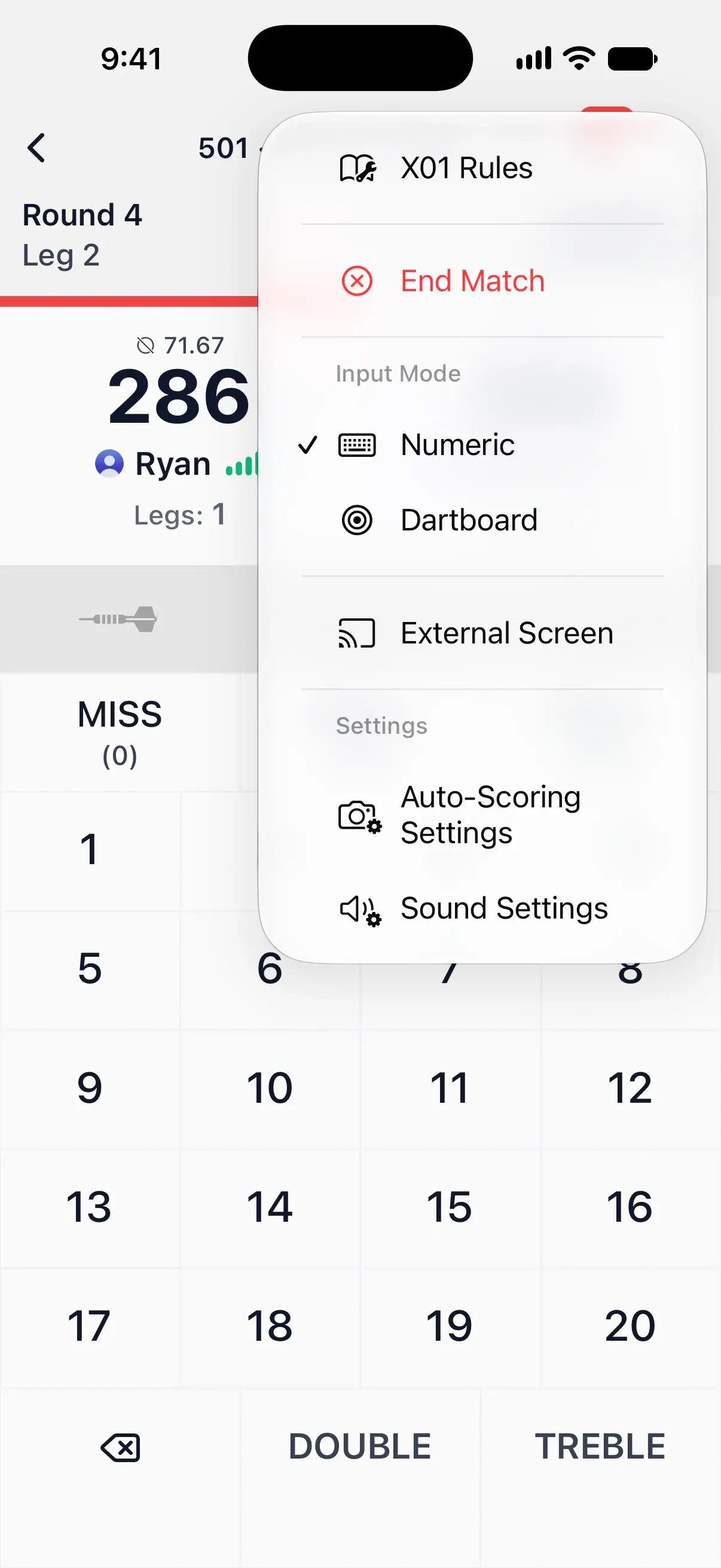
In X01, Cricket, Count Up, Killer and 121 Checkout, switch between the keypad and the dartboard in the … menu, under Input Mode. Numeric is the keypad. The other games show buttons for the current target. You can switch at any time, even mid-leg.
Auto-Scoring needs DartsOn Premium after a limited number of free games, and an online match counts toward them like a local one. Voice input isn’t available online.
When your turn is done, tap Next, or let Auto-advance Turns pass it on. Between legs, the host starts the next leg, and the other player’s leg summary reads Waiting for the host to start.
Tap the match title at the top to see the match settings. In X01 it also has Turn by Turn, every turn of the match so far.

What your opponent sees
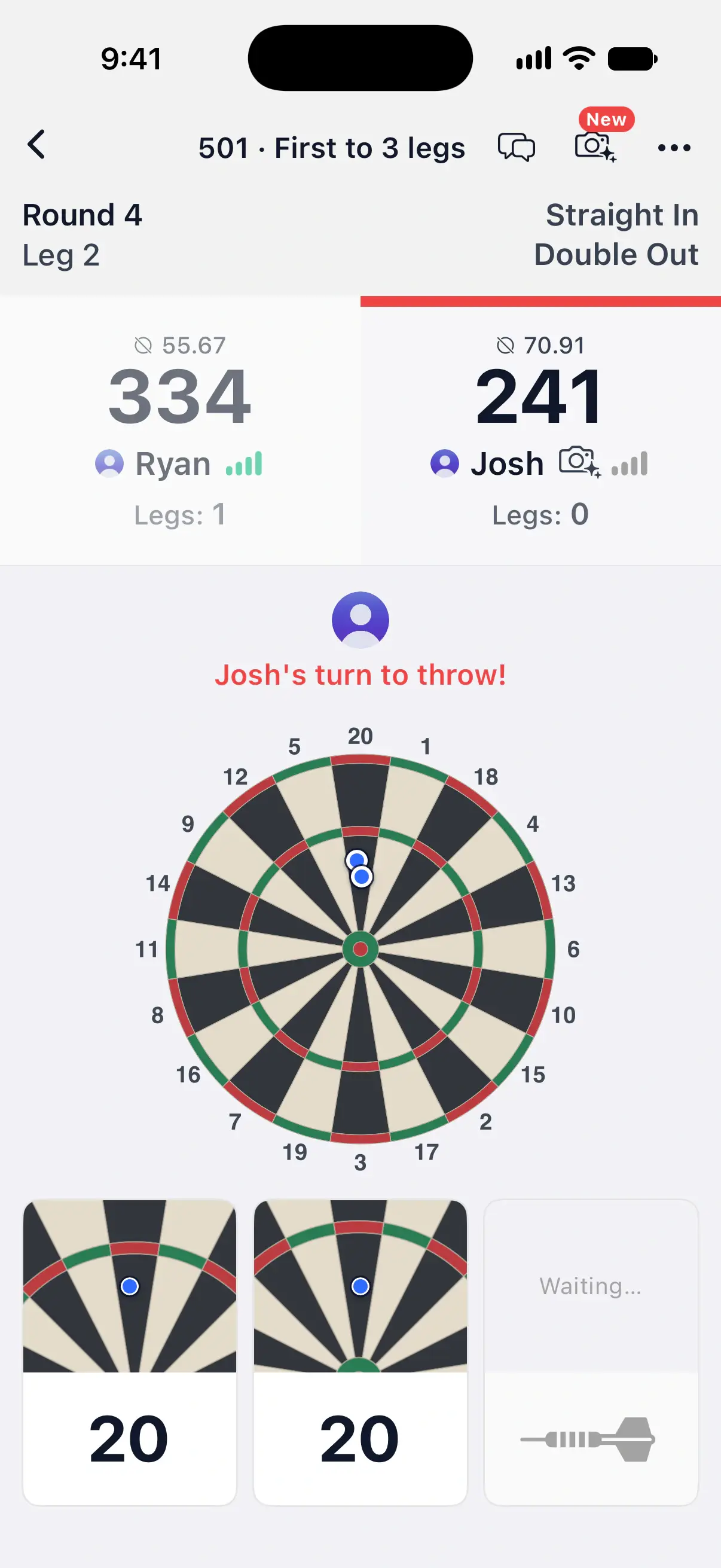
While you throw, your opponent’s screen shows your photo with a line such as “Ryan’s turn to throw!” above your board. Each dart appears the moment you score it. With the camera or the dartboard, it lands on the spot where it hit, with a close-up below. Keypad darts show as their score.
Next to each player’s name are two small signs:
- How they score. A keypad, dartboard or camera icon. It changes when they switch.
- Their connection. Signal bars that turn grey when the connection drops.
While your finished turn waits to pass on, your opponent sees a red bar over your score run down to the moment the turn moves to them.
See and hear your opponent
In a match with live video and audio unlocked, you can share your scoring camera, watch your opponent’s board while they throw, and talk through your microphones. One player with DartsOn Ultra unlocks it for everyone in the lobby. See live video and audio.
Correct a dart
- In the turn you’re throwing. Undo the last dart as you would in a local game, and enter it again.
- While the turn waits to pass on. Go Back to fix a dart before the turn moves on. This is what Auto-advance Turns gives you time for.
- In an earlier turn, in X01. Tap your score panel to open your rounds for the leg. Tap the wrong dart, then pick the right score in Edit Dart Result.
Both players are told when a dart is corrected, and the dart keeps a pencil mark in the rounds and in Turn by Turn, such as T20 corrected from S20. A correction has to fit the darts thrown after it. If it would turn a later turn into a bust or undo a checkout, DartsOn refuses it with That correction doesn’t fit the darts thrown after it. A finished leg stays as it was played.
Caller callouts
The caller announces the match as it does a local game, with your Voice Caller settings in Sound Settings. You hear your opponent’s darts and scores as well as your own, plus game on, checkouts and game shot. See caller settings.
If a connection drops
The match pauses for both players while anyone is away, and the screen reads Paused while a player reconnects. You’ll see Connection lost and Reconnected for your own connection, or a message with your opponent’s name when theirs drops and comes back. Your turn clock stops while your opponent is away.
- Your phone lost signal. DartsOn reconnects by itself, and the match carries on where it was. If it was your turn, your clock kept running while you were away.
- You left the match screen. DartsOn first asks Leave the match? and gives you 60 seconds to come back, or the match is cancelled. Go back in with Rejoin on the Ongoing Online Match card at the top of the Online tab, which counts down the time left.
- Your opponent is away. The top of the screen counts down how long they have to come back. If they don’t make it, the match ends.
If the match opens on another of your devices, this one shows Playing on another device. Tap Play Here to carry on from this phone.
End a match for everyone
- Tap the … menu.
- Tap End Match.
- Confirm with End Match.
The match stops for both players, and you each see its summary with what was played so far. Use it when you both agree to stop, so neither of you has to wait out a timer. In a Global Lobby match, ending it early counts as quitting, as leaving does, unless your opponent had run out of time.
Ask for a rematch
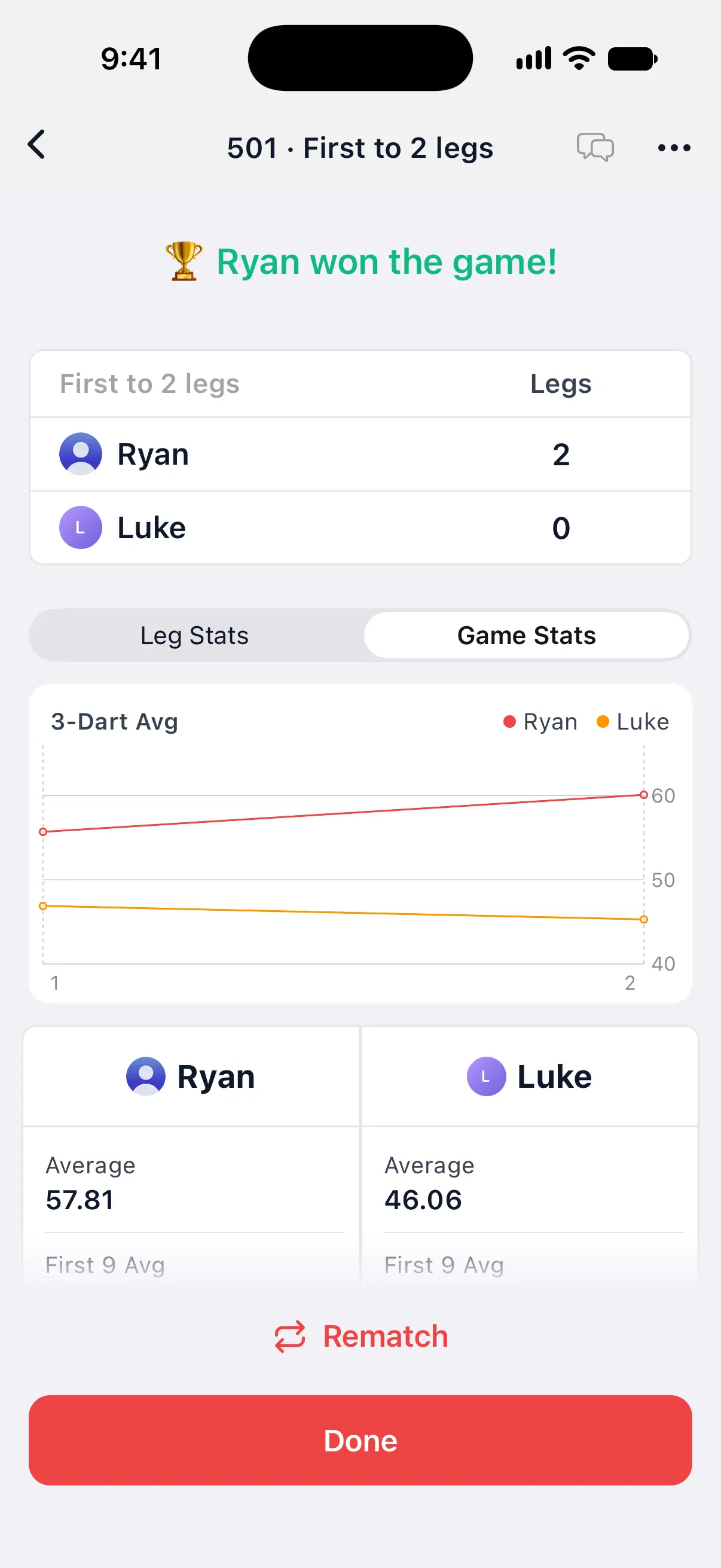
When the match ends, the summary shows Rematch.
- Tap Rematch. You see Waiting for your opponent, with Cancel Rematch.
- Your opponent sees that you want a rematch and taps Accept or Decline.
- If they accept, you both go back to the lobby with the same settings, and the host taps Start Match.
A request your opponent doesn’t answer lapses after 2 minutes. If they’ve already left the summary, Rematch takes you straight back to the lobby, where you can invite them again or share the code. Rematches in the same lobby don’t count toward the weekly limit on hosted matches.
Done leaves the room. Your match is saved in Match History either way. See online stats and profiles.
When a match is cancelled
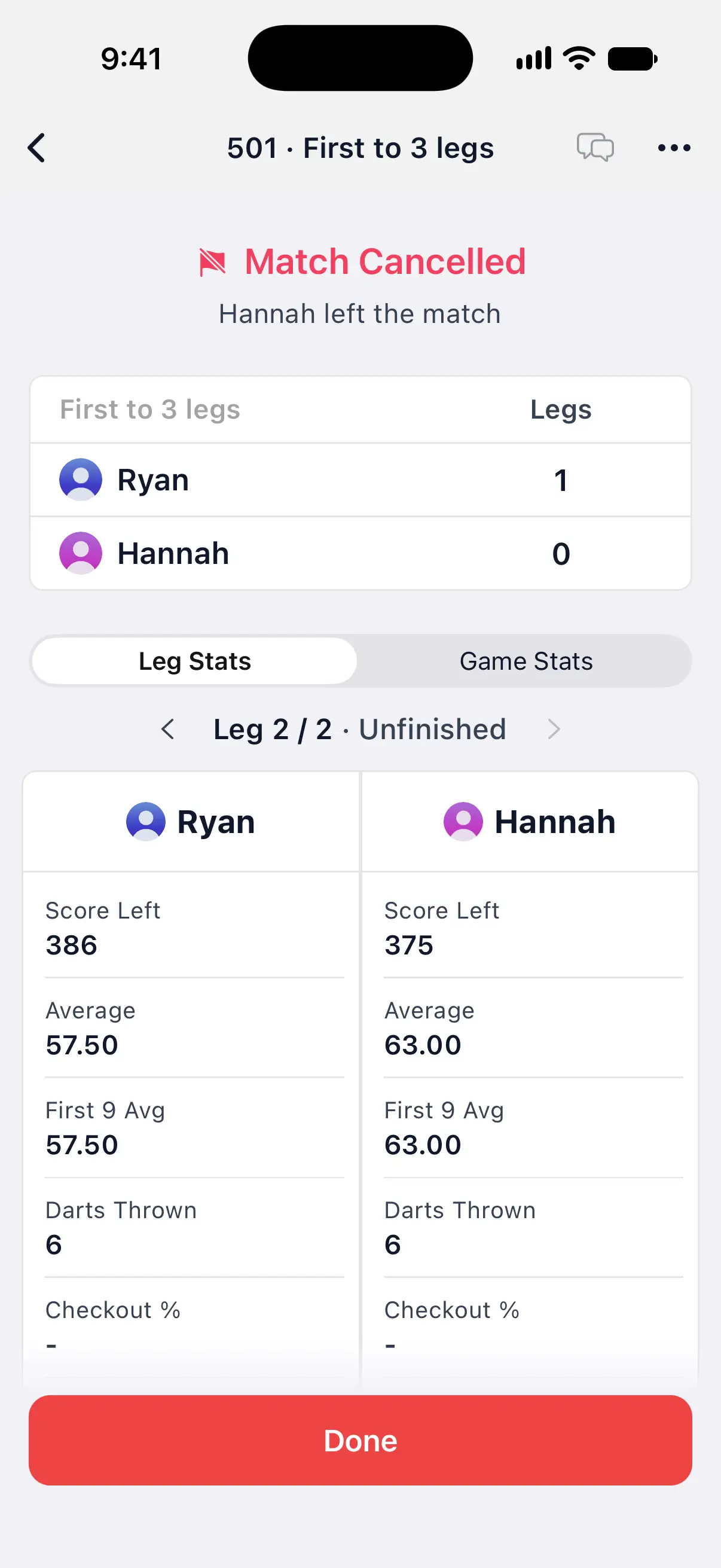
A match that doesn’t reach its end shows Match Cancelled at the top of the summary, with the reason. A match is cancelled when:
- A player ends it with End Match.
- A player leaves and doesn’t come back within the minute.
- A player runs out of time and nobody gives extra time.
- Nobody plays for so long that the match expires.
The summary keeps the legs completed before then, and the leg it stopped in is marked Unfinished. A cancelled match doesn’t count toward your online stats. In a cancelled match, Rematch is offered only when a player ended it with End Match. After a leave or an expiry there’s nobody to play again.
The match appears in Match History as Cancelled. In the Global Lobby, leaving a match before it ends counts as quitting.
Questions and answers
Can I use voice input in an online match?
No. Online matches take the keypad, the dartboard and camera auto-scoring. The caller still announces the darts and scores of both players.
What happens if my internet drops during an online match?
DartsOn reconnects by itself, and the match carries on where it was. Your opponent can't throw while you're away, and their clock waits for you, but if it was your turn, your own clock keeps running. If you left the match screen, tap Rejoin at the top of the Online tab.
Can my opponent see if I fix a dart?
Yes. Both players are told when a dart from an earlier turn is corrected, and the dart is marked as corrected in the rounds and in Turn by Turn.
Does camera auto-scoring work in online matches?
Yes. Turn it on with the camera button at the top of the match. Your opponent sees each dart land where it hit the board. An online match played with Auto-Scoring counts toward your free Auto-Scoring games, like a local game.
Related
- Online match presets and match settings Save the online darts matches you play most as presets, pick the one Create Match plays, and set the turn timer, auto-advance and throw order.
- Live video and audio in online darts matches See your opponent's board through their scoring camera and talk as you play. Unlock live video and audio with DartsOn Ultra or a Premium live match pass.
- Quick Chat and reactions in online darts matches Send your opponent a preset phrase or an emoji reaction during a DartsOn online match, shower a reaction across their screen, or mute their chat.
- How to set up camera auto-scoring in DartsOn Place your phone by the board, turn on Auto-Scoring and let the camera score each dart. What you need, where to put the phone and how each turn works.
- Play darts online | DartsOn Online Play darts online with live scores, camera auto-scoring, live video and audio. Challenge anyone to 501, Cricket, Killer and more on your own dartboards.