
How to create a darts game in DartsOn
Start a new darts game in DartsOn. Name it, pick one of 14 games, set the starting score, in and out rules and match length, then tap Create Game.
Start a local game from New Game on the Home tab, or tap a game tile to open its setup directly. You pick a game, add the players and set the rules, then DartsOn opens the scoreboard. A Home preset can keep your usual players and settings.
Start a new game
- On the Home tab, tap New Game.
- DartsOn names the game after the weekday, such as “Wednesday Darts”. To change the name, tap Game Name and type a new one.
- Tap the game you want to play. The setup screen opens with Players at the top and Game Settings below.
- Add the players, check the settings and tap Create Game. The button works once the game has a player, or 2 in Killer.
With 2 or more players, DartsOn then asks who throws first. See throw order for the options and enter scores for scoring.
The book button at the top right opens the rules. On New Game it opens the whole Rule Book. On the setup screen it opens the rules of the game you picked.
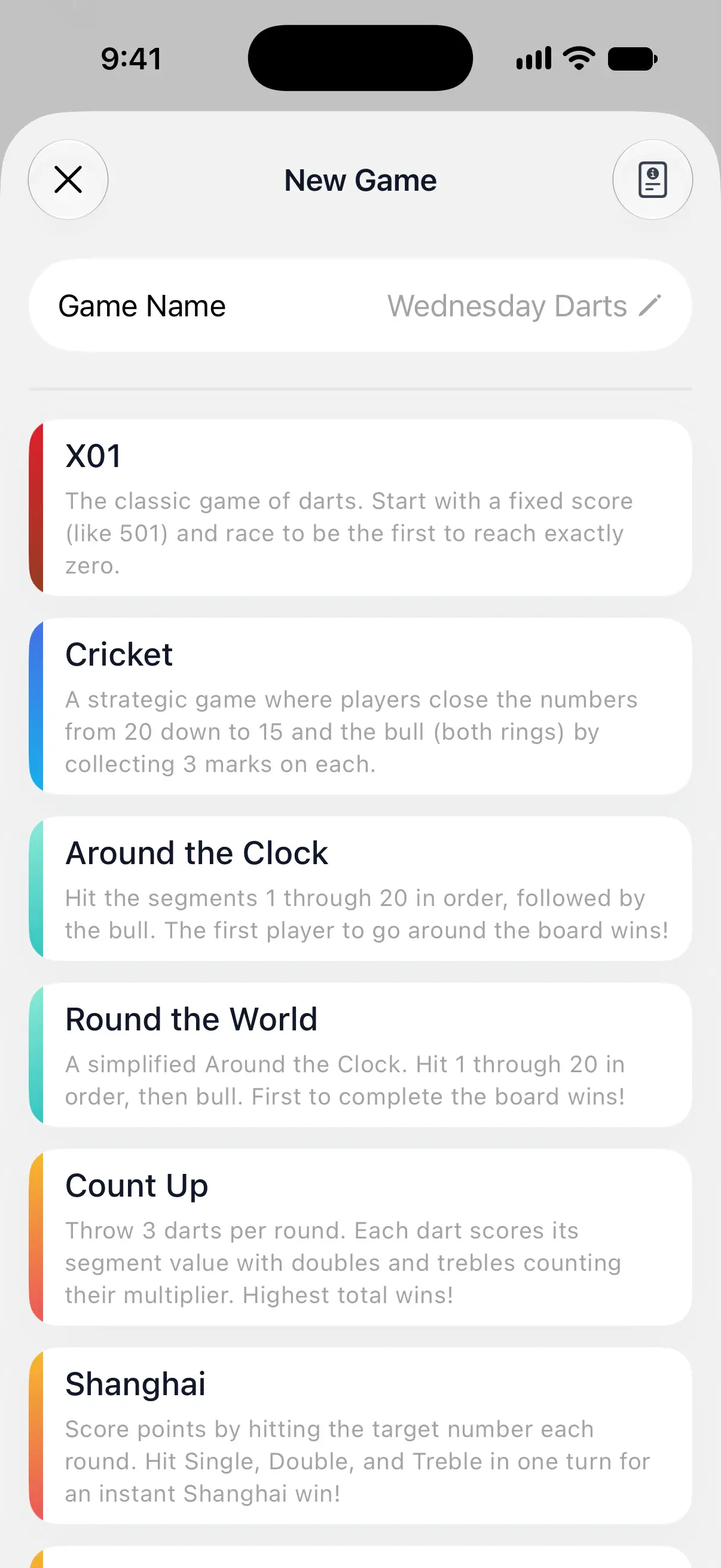

Choose a game
DartsOn has 14 games. Each one links to its full rules.
| Game | What it is | What you can set |
|---|---|---|
| X01 | Count down from a starting score such as 501 to exactly zero. | Starting score, in and out rules, bull scoring, round limit, legs and sets |
| Cricket | Close 20 down to 15 and the bull with 3 marks each, and score on the numbers you’ve closed. | Variant, including Cut Throat and No Score, round limit, legs |
| Around the Clock | Hit 1 to 20 in order, then the bull. | Singles, doubles or trebles only, hits per target, order, house rules, legs and sets |
| Round the World | A simpler Around the Clock. | Order, skipping ahead with doubles and trebles, legs and sets |
| Count Up | Every dart scores its value, and the highest total wins. | A number of rounds or a target score, bull scoring, legs |
| Shanghai | Each round has its own target. A single, double and treble of it in one turn wins on the spot. | Short or full board, halving on a miss, legs and sets |
| Half It | Start on 40 and hit each round’s target. Miss it with all 3 darts and your score is halved. | Standard or random targets, legs and sets |
| Killer | Claim a number, become a killer and take the other players’ lives. For 2 or more players. | Lives, how numbers are assigned, which segments count, self-hit penalty |
| Bob’s 27 | Doubles practice from D1 to the bull, starting on 27 points. | Hard or easy mode |
| JDC Challenge | A fixed 57-dart routine of Shanghai, doubles and Shanghai, scored into badge tiers. | None, the format is fixed |
| 121 Checkout | Finish a starting score within a set number of darts, then move up. | Starting score, darts per round, safehouse rules, rounds |
| Singles Training | Accuracy practice on single numbers. | All targets in order or one dedicated target, number of targets, what doubles and trebles score |
| Doubles Training | Work through the doubles one by one. | Number of targets, order, legs |
| Checkout Trainer | Solo practice of random checkouts. | Out rule, darts per attempt, score range, session length |
Checkout Trainer is for one player. Its setup has no Players section, and the button reads Start Game. DartsOn starts the session with your own player.
Set up an X01 game
X01 has the most settings, so it’s a good example of how the setup works. Tap a row to see its choices.
- Starting Score: 301, 501 or 701. Tap Enter custom starting score for any score from 11 to 9,999. 501 is the standard match game, and 301 is a quicker one.
- Starting Rule: with Straight In, every dart counts from the start. With Double In, your score only starts going down once you hit a double. Master In accepts a double or a treble.
- Ending Rule: with Double Out, the last dart of a leg must be a double. Straight Out lets any dart finish, and Master Out accepts a double or a treble.
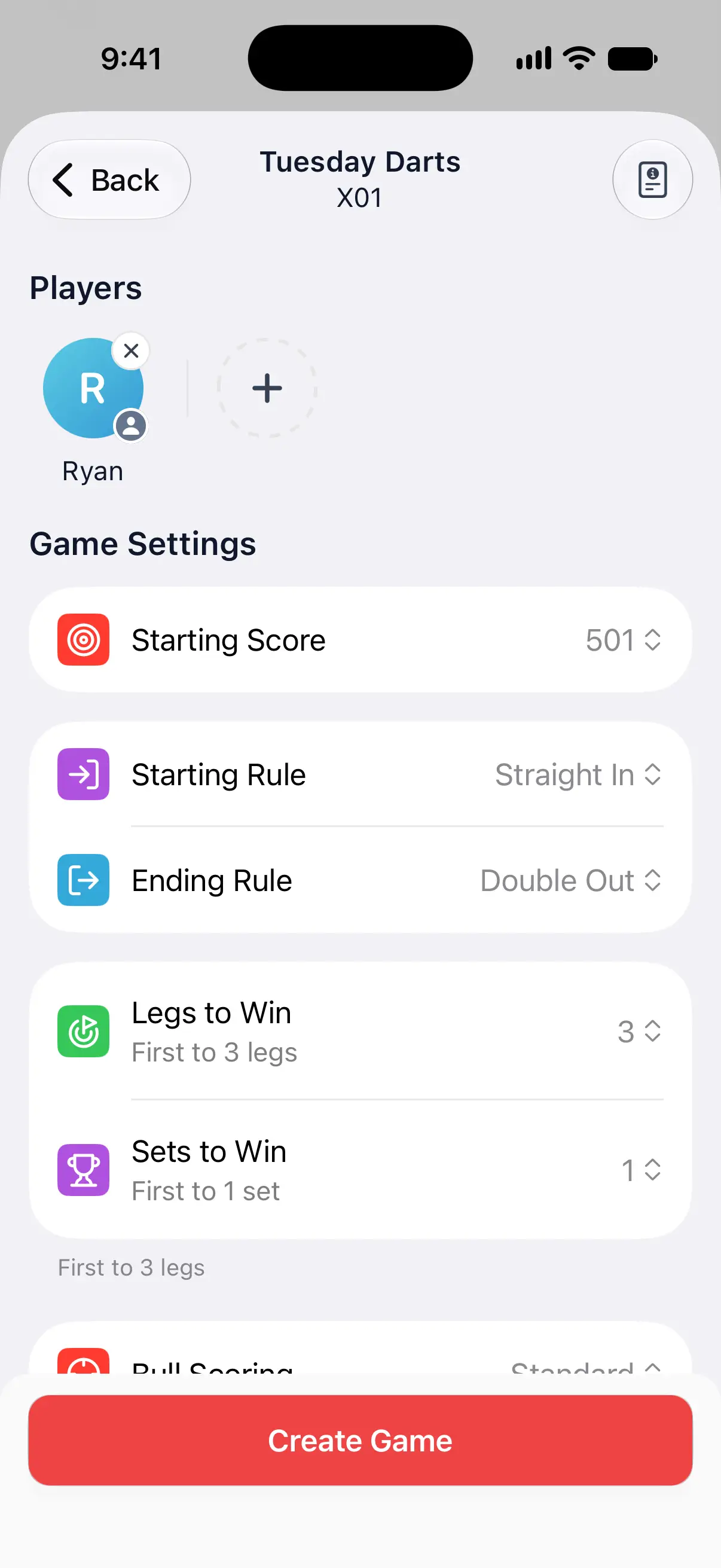
Double Out is the standard rule. For a beginner, Straight Out removes the hardest part of the game, hitting a double to finish.
Set the match length
A leg is one game from the starting score down to zero. Legs to Win decides how many legs the match lasts:
- First to: 1 to 7 legs. First to 3 means the first player to win 3 legs wins the match.
- Best of: 3, 5, 7, 9 or 11 legs. The match ends when one player has won most of them, so Best of 5 ends at 3 wins.
- Enter custom legs count: any number up to 99. It keeps the First to or Best of you picked last.
Sets to Win groups legs into sets. With 1 set, the match is just the legs above. With more, each set is played to the Legs to Win target and the match to the sets. The line under the rows spells out the format, such as “First to 2 sets (first to 3 legs each)”.
Sets are available in X01, Around the Clock, Round the World, Shanghai and Half It. Cricket, Count Up, Singles Training and Doubles Training are played in legs. Killer, Bob’s 27, the JDC Challenge, 121 Checkout and Checkout Trainer are a single game, and so is Singles Training with a Dedicated Target, which runs until you end it.
More X01 options
Scroll down for more:
- Bull Scoring: Standard scores 25 for the outer bull and 50 for the bullseye. Fat Bull scores 50 for both, as many soft-tip players do. With Fat Bull, only the bullseye counts as a double for the in and out rules.
- Allow Finish Round: shown with 3 or more players. The leg keeps going after the winner checks out, to decide second place, third place and so on.
- Max Rounds: 15, 20, 50 or 80 rounds per leg, Unlimited or Custom. If nobody has checked out when the limit is reached, the lowest remaining score wins the leg. A tie goes to overtime, where play continues until one player takes the lead.
To give each player their own starting score or rules, see handicaps.
Settings in the other games
The other games follow the same pattern: a few rows for the game’s own rules, then the match length where the game has one. Rows such as Variant, Order or Lives list their choices when you tap them, and many have a line underneath that explains the current choice.
Each game’s rules page, linked in the table above, explains every option and its default.
In Cricket, Max Rounds limits a leg. If the result is tied at the limit, it goes to overtime until a player takes the lead. Random and Hidden Cricket also let you include or leave out the bull. Shanghai’s Halve on Miss halves a player’s score when they miss the round’s target with all 3 darts.
DartsOn remembers your last setup
When you create a game, DartsOn saves its settings for that game mode. The next time you pick the same mode, the setup opens with those settings and with the players from your last game of that mode. If you haven’t played the mode yet, it starts with just your own player.
Handicaps start fresh in an ordinary new setup. To keep them, save a Home preset, duplicate the game from Home, or tap New Game on its summary. See handicaps and manage your games.
Questions and answers
What is the difference between First to and Best of in DartsOn?
First to 3 legs means the first player to win 3 legs wins the match. Best of 5 legs means the match ends when one player has won most of the 5 legs, so 3 wins are enough.
How do I play 501 double in, double out?
Pick X01, set Starting Score to 501, Starting Rule to Double In and Ending Rule to Double Out, then tap Create Game.
Can I change the rules after a game has started?
No. A game's rules are fixed once it starts, and Game Info only lets you rename it. To play different rules, duplicate the game from the Home tab, change the settings and tap Create Game.
Why can't I tap Create Game?
A game needs at least one player, and Killer needs at least 2. Add players under Players and the button becomes active.
Related
- Add players and bots to a darts game Add yourself, new or saved players, friends, phone contacts or bots to a DartsOn game. Pick a bot level, then rename or remove players before you start.
- Set player handicaps and head starts in DartsOn Balance local darts games with player handicaps. Set X01 rules, Cricket marks, starting scores, lives or target requirements for each player.
- Decide who throws first in a darts game Set the throw order in DartsOn. Drag players into order, throw for the bull by tapping or with the camera, or spin the wheel, and change it in the first round.
- How to enter darts scores in DartsOn Enter each dart in DartsOn with the keypad or by tapping the dartboard, undo mistakes, use the turn summary and score in landscape or on a tablet.