
What DartsOn Premium and Ultra include and how to get them
See what's free in DartsOn, what Premium adds and what Ultra adds on top. Buy a plan in the App Store or Google Play, upgrade, restore a purchase, or cancel.
DartsOn is free to score with. Every game mode, unlimited local games, bots to play against and the X01 headline stats cost nothing, and there are no ads. DartsOn Premium removes the limits on the extras and unlocks the full statistics. DartsOn Ultra includes everything in Premium and adds live video and audio in online matches and more cloud storage for Action Replays.
What’s free and what Premium adds
| Feature | Free | With Premium |
|---|---|---|
| Local games in all 14 modes | Unlimited | Unlimited |
| Players and bots per game | Up to 8 | No limit |
| Camera auto-scoring | A limited number of games | Unlimited |
| Live scoreboard link | A limited number of matches | Unlimited |
| Cast and TV Layout | Unlimited | Unlimited |
| Caller voices | One prerecorded voice, plus your device’s system voices | Every prerecorded voice |
| Statistics | The X01 headline card and your record against bots | Trend charts, full tables, records and the stats for the other game modes |
| Heat maps | On each game’s summary | Also the Heatmap card on the Statistics tab |
| Hosting online matches | A limited number each week. Joining is never limited. | Unlimited |
| Online stats | The X01 headline card | Every card |
| Action Replays in the cloud | Up to 10 starred replays | 5 GB |
| App Theme colors | Red and Blue | All 6 |
| App icons | Default and Blue | All 6 |
Extra cameras don’t count toward the free auto-scoring games. See extra cameras.
What Ultra adds
DartsOn Ultra has everything in the Premium column above, plus:
| Feature | With Premium | With Ultra |
|---|---|---|
| Live video and audio in online matches | With a live match pass, while you have one left this month | In every match you play. Your Ultra unlocks it for everyone in the lobby. |
| Action Replays in the cloud | 5 GB | 50 GB |
Get Premium
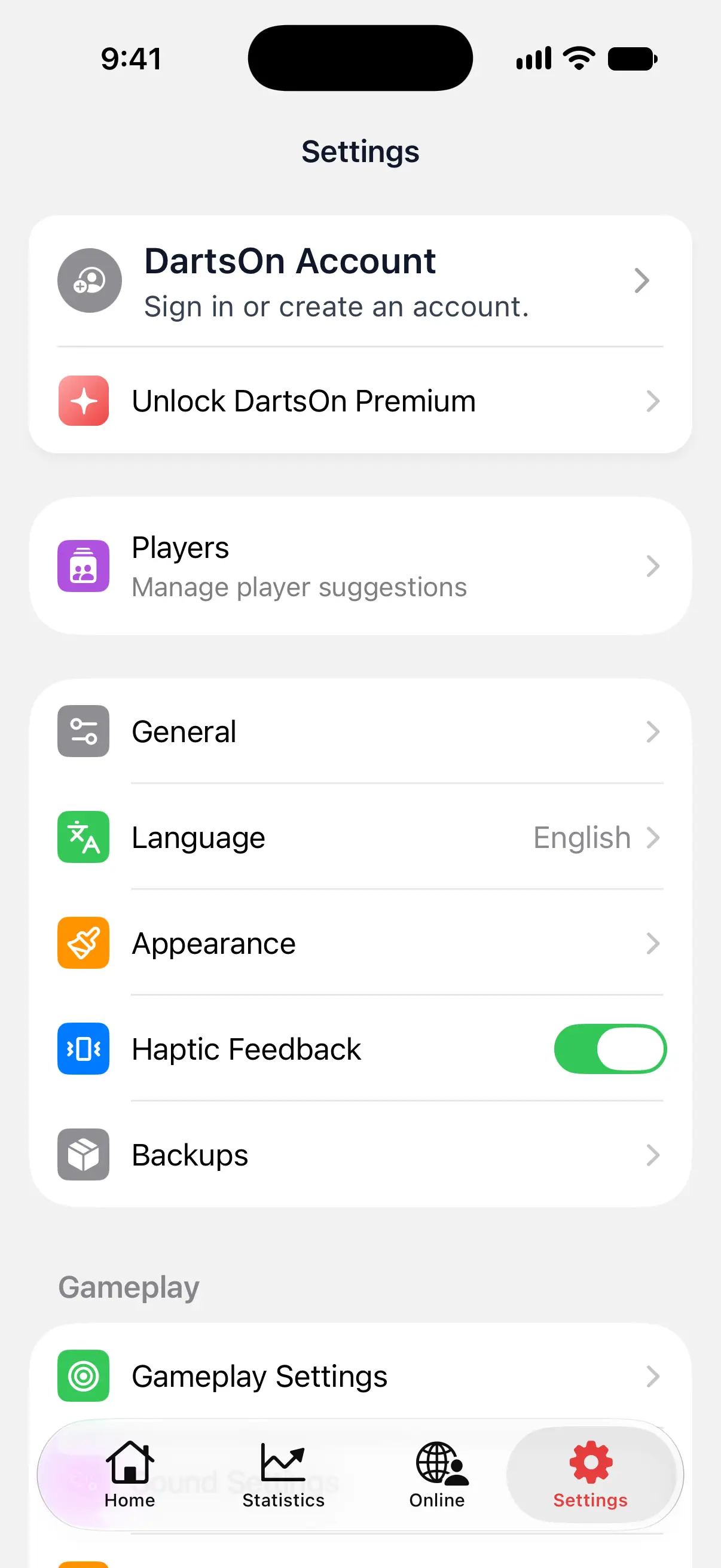
- Open Settings and tap Unlock DartsOn Premium. Tapping a Premium feature, such as a locked color or a blurred chart, also opens the Premium plans.
- Choose a plan. The screen shows the prices for your country, and whether a plan starts with a free trial.
- Confirm the purchase with the App Store or Google Play.
DartsOn sells Premium and Ultra only through the App Store and Google Play, and the store handles the payment.

Get Ultra
Without a subscription:
- Open Settings and tap Unlock DartsOn Premium.
- At the top of the plans, switch from Premium to Ultra.
- Choose a plan and confirm the purchase.
Signed in, you can also tap your name on your profile and choose Unlock DartsOn Ultra.
With Premium, the Ultra plans open from the places Ultra unlocks:
- Get Ultra in a lobby’s live video & audio sheet. See live video and audio.
- Upgrade to Ultra for 50 GB in Settings → Action Replays → DartsOn Cloud Storage, once your cloud is nearly full.
- Upgrade to DartsOn Ultra in Settings, if the row is there.
Upgrade from Premium to Ultra
When you bought Premium on the platform you’re using, buying Ultra upgrades it. Ultra replaces your Premium subscription. The store handles the adjustment for unused Premium time and shows the purchase details before you confirm.
If DartsOn says Upgrade where you subscribed, your Premium was started on another platform, such as an iPhone when you’re now on Android. It can’t be upgraded from this app. Open DartsOn on the platform where you subscribed and upgrade there, or manage the subscription in that store.
Use your plan on your other devices
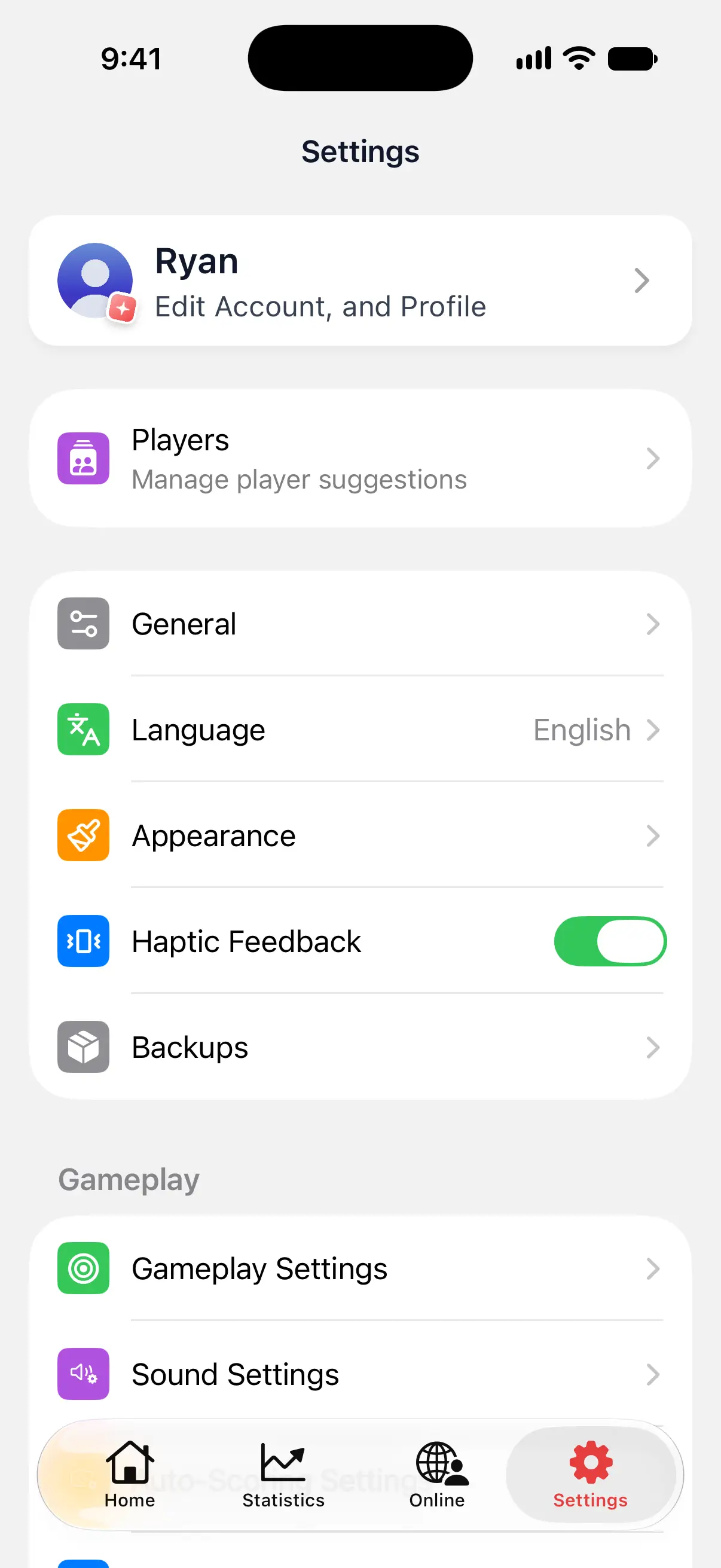
When you’re signed in, Premium or Ultra belongs to your DartsOn account. Sign in to the same account on another phone or tablet and your plan is there too. Your profile picture shows a badge, red for Premium and black and red for Ultra. In Settings, the Unlock DartsOn Premium row is gone. See create an account.
If you bought Premium before signing in, DartsOn carries the purchase over to your account when you sign in on the device with that purchase. Then sign in to the same DartsOn account on your other devices.
Without an account, your plan stays with the App Store or Google Play account you bought it with. Use Restore Purchase to bring it to a new device.
Restore a purchase
If you reinstalled DartsOn or moved to a new phone and Premium isn’t showing:
- Make sure the device uses the Apple ID or Google account you bought Premium with.
- Open Settings and tap Unlock DartsOn Premium.
- Tap Restore Purchase at the bottom of the screen.
If restoring doesn’t work, DartsOn says Restore Failed. Try again later, or sign in to your DartsOn account if you bought Premium while signed in.
Restoring on the Ultra plans with only Premium on your store account says No Ultra Purchase Found. Your Premium is still active.
Manage or cancel your subscription
- Open Settings.
- In the group with Share DartsOn and Feedback, tap Manage Subscription.
It shows your subscription, with the options to change or cancel it. Signed in, you’ll also find Manage Subscription on your profile. Tap your name and choose DartsOn Premium or DartsOn Ultra.
Outside DartsOn, manage it in your iPhone’s Settings under your name → Subscriptions, or in the Google Play Store app under Payments & subscriptions → Subscriptions.
After you cancel, your plan stays on until the end of the period you’ve paid for.
Questions and answers
Is DartsOn free?
Yes. Scoring local games is free in every game mode, with up to 8 players and no ads. Premium removes the limits on camera auto-scoring, players, live scoreboards and hosted online matches, and adds advanced statistics and every caller voice.
What's the difference between DartsOn Premium and DartsOn Ultra?
Ultra includes everything in Premium. It adds live video and audio in online matches, which one Ultra player unlocks for everyone in the lobby, and 50 GB of cloud storage for Action Replays where Premium has 5 GB.
Can I upgrade from Premium to Ultra?
Yes, on the platform where you bought Premium. Ultra replaces your Premium subscription, so you don't pay for both. If you subscribed on another platform, upgrade there.
Does DartsOn Premium work on my other phone or tablet?
Yes, when you're signed in. Premium and Ultra belong to your DartsOn account, so your plan is on every device where you sign in to that account.
How do I cancel DartsOn Premium or Ultra?
Open Settings → Manage Subscription, or the subscription settings of the App Store or Google Play. Deleting the app or your DartsOn account doesn't cancel the subscription.
I reinstalled DartsOn and Premium is gone. How do I get it back?
Sign in to your DartsOn account, or open the Premium screen and tap Restore Purchase while you're using the same Apple ID or Google account you bought it with.
Related
- Get started with DartsOn Set up DartsOn, start your first darts game, pick how to enter your darts and find your way around the Home, Statistics, Online and Settings tabs.
- Darts auto-scoring with your phone camera | DartsOn Turn your phone into an automatic darts scorer. DartsOn's on-device AI reads every dart through your camera. No electronic board, no tapping, fully offline.
- Log out of DartsOn or delete your account Log out and keep or clear the games on this device, or delete your DartsOn account and its cloud data, optionally with device data and backups.
- Live video and audio in online darts matches See your opponent's board through their scoring camera and talk as you play. Unlock live video and audio with DartsOn Ultra or a Premium live match pass.
- How to record and share Action Replays in DartsOn Record X01 turns while camera auto-scoring keeps score, then watch, star and share the best ones, and keep them in the cloud across your devices.