
How to choose a caller voice in DartsOn
Pick a prerecorded darts caller or a system voice, preview and download voices, and add more text-to-speech voices on iPhone and iPad.
The caller is the voice that announces your scores. Choose one of 13 prerecorded callers in 8 languages, or one of the text-to-speech voices on your phone that DartsOn lists, and change it whenever you like.
Open the voice list
- Open the Settings tab and tap Sound Settings. During a game, you can also open the menu at the top right of the game screen and tap Sound Settings.
- Scroll down past the Voice Caller options to Premium Voices and System Voices.
The voice list is hidden while Voice Caller is set to Disabled. Choose any other mode to see it. Learn what each mode does.
Prerecorded callers
These are the prerecorded callers in DartsOn. Each one calls in its own language.
| Voice | Language | Accent and style |
|---|---|---|
| Arthur | English | British, calm BBC-style delivery |
| George | English | London, gravelly stadium voice |
| Harry | English | London, deep theatrical baritone |
| Logan | English | British, smooth broadcast baritone |
| Olivia | English | British, bold and theatrical |
| Paddy | English | Irish, a Dublin storyteller |
| Hans | German | Commentator, sharp and precise |
| Tarmo | Estonian | Tournament announcer, steady baritone |
| Zoltán | Hungarian | Arena announcer, warm baritone |
| Mikko | Finnish | Arena announcer, composed baritone |
| Julien | French | Arena announcer, deep and raspy |
| Marco | Italian | Arena announcer, deep and measured |
| Tomáš | Czech | Arena announcer, precise diction |
DartsOn puts voices in your phone’s languages at the top of the list, so a German phone shows Hans first.
Preview, download and choose a voice
- Tap a voice’s picture to hear a sample. Tap it again to stop.
- Tap the voice’s name to download it. A percentage shows the progress, and DartsOn selects the voice once it’s downloaded.
- To switch between voices you’ve already downloaded, tap the one you want. A checkmark marks your current caller.
Each voice downloads once, about 7 to 13 MB, and then calls your games without an internet connection. Samples stream, so previewing needs a connection.
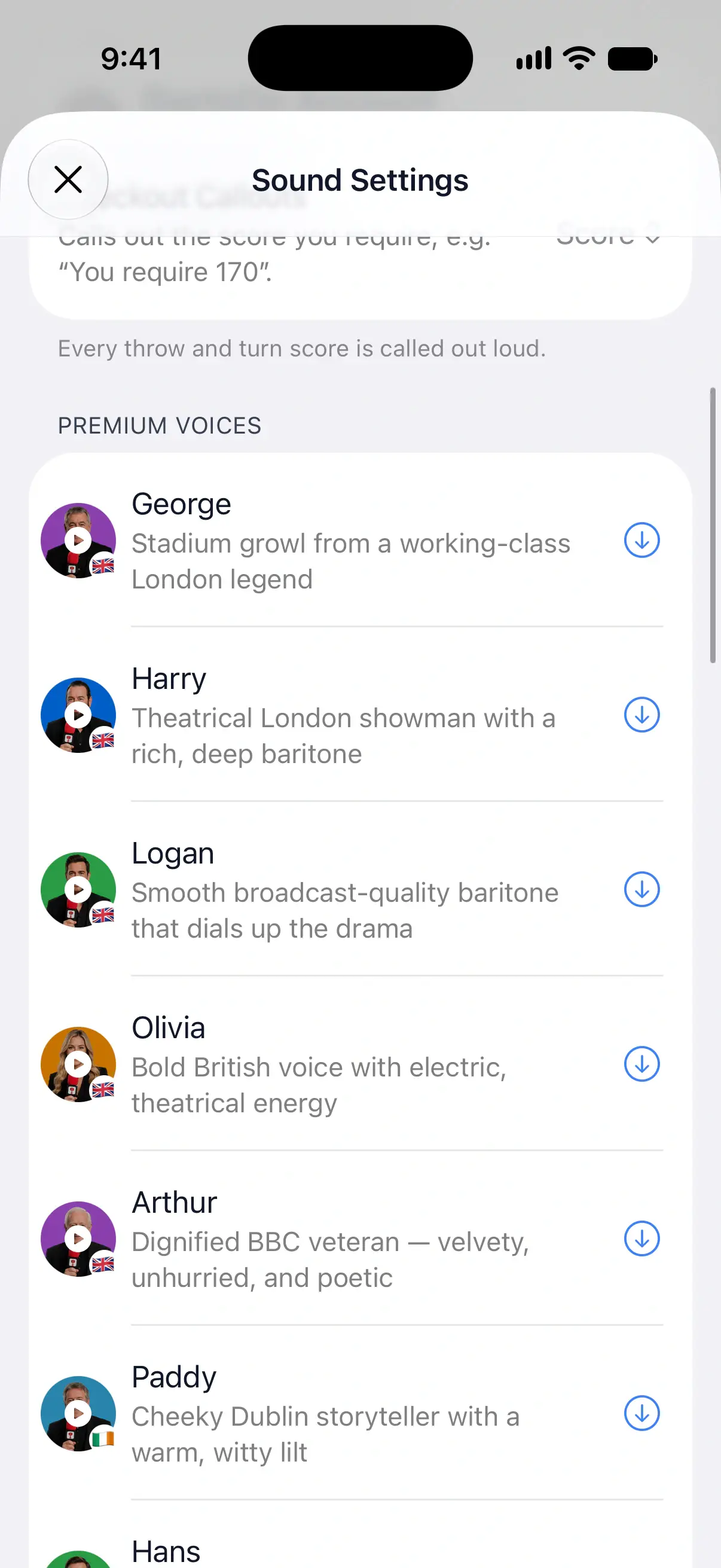

Premium voices and your free voice
Prerecorded voices need DartsOn Premium, except for one free voice. It’s the voice you pick during onboarding, or the first prerecorded voice you download.
Once you’ve used your free voice, the other voices show a lock without Premium, and tapping one opens DartsOn Premium. Voices already on your phone keep working, so if your Premium ends, you keep every voice you downloaded. Your free voice can be deleted and downloaded again, but downloading any other voice again after you delete it needs Premium. Learn about DartsOn Premium.
System voices are free for everyone.
Delete a voice
Downloaded voices take up space on your phone. To remove them:
- Touch and hold a downloaded voice, then tap Delete Voice.
- To remove all of them at once, tap Delete All Downloads below the list. It shows how much space the downloads use.
Use a system voice
System Voices are the text-to-speech voices built into your phone, and they’re free.
DartsOn lists up to 2 voices for each language the app supports, starting with the language your app uses, and favors higher-quality voices. Tap the play button to hear a voice say “180”, then tap its name to choose it.
On Android, the list shows the voices of your phone’s text-to-speech engine.
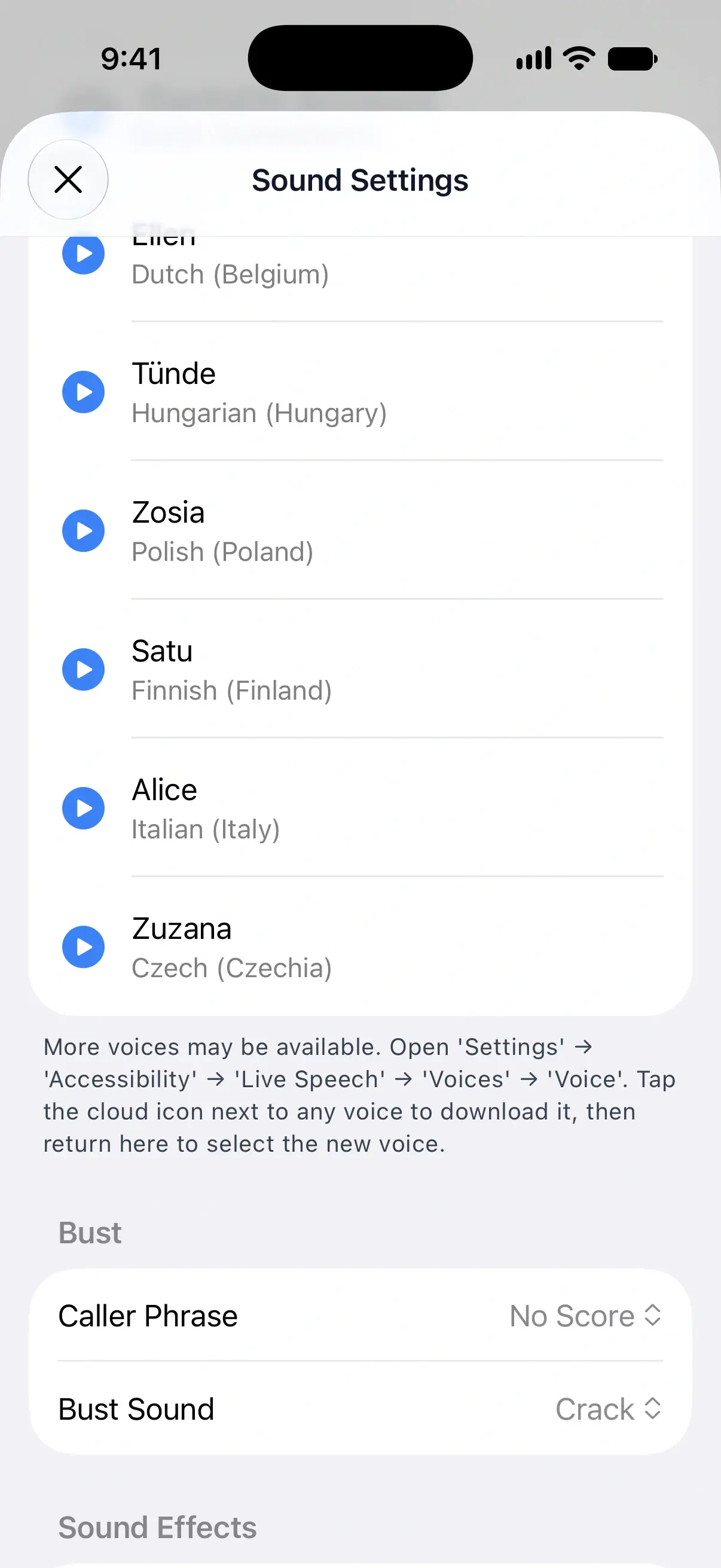
Add more system voices on iPhone and iPad
DartsOn’s own instructions are at the bottom of System Voices:
- Open the Settings app on your iPhone or iPad.
- Go to Accessibility → Live Speech → Voices → Voice.
- Tap the cloud icon next to a voice to download it.
- Return to DartsOn. The list refreshes, and you can select the new voice.
If the voice you downloaded doesn’t appear, DartsOn may already be showing 2 voices it ranks higher for that language. It favors higher-quality voices, so an Enhanced or Premium version has the best chance of being listed.
Choose a caller during onboarding
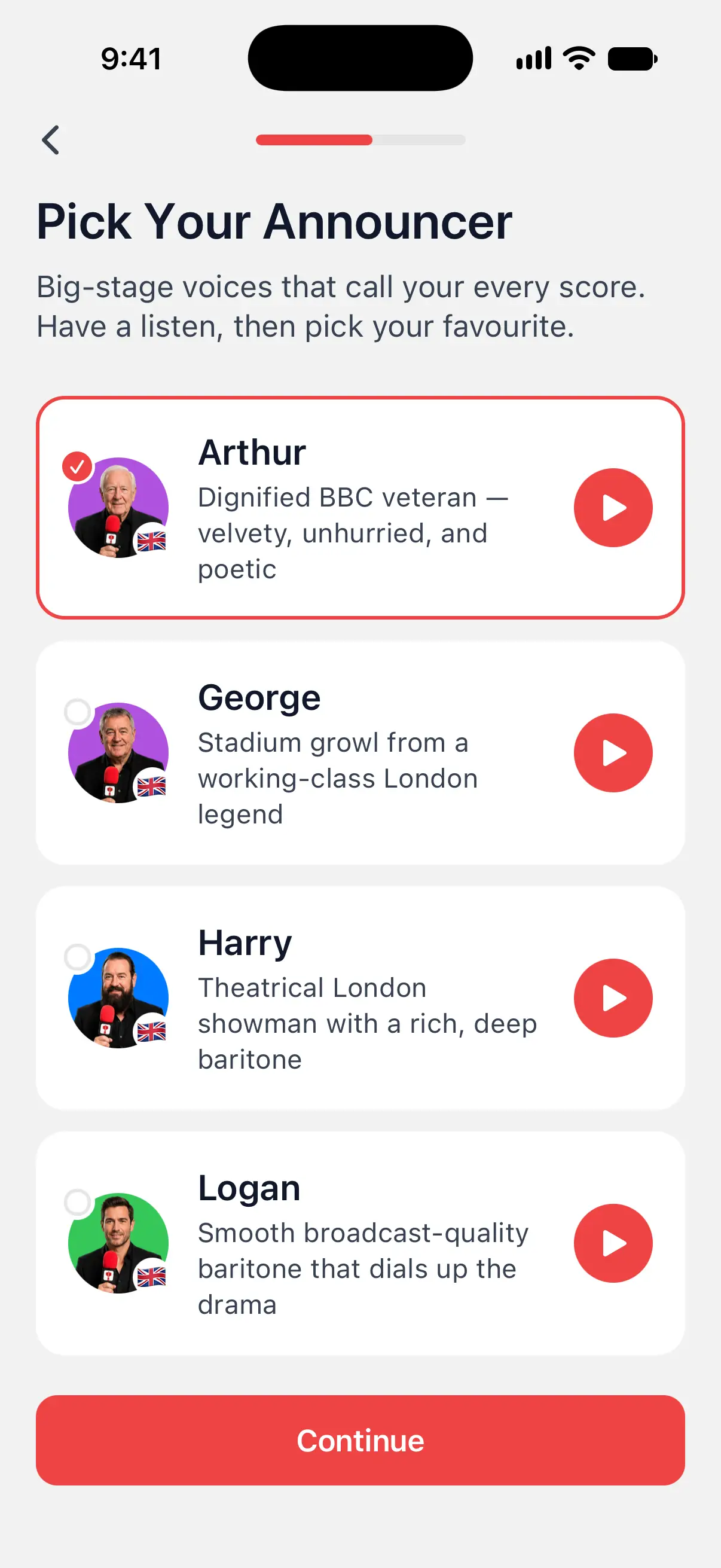
The first time you open DartsOn, Pick Your Announcer lists the prerecorded callers with Arthur already selected.
- Tap the play button on a card to hear that caller.
- Tap the card of the caller you want.
- Tap Continue.
DartsOn downloads your pick in the background, and it becomes your free prerecorded voice. If the download doesn’t finish, your free pick is still open, so you can download the voice later from Sound Settings.
Questions and answers
Which DartsOn caller voices are free?
Every system voice is free, and so is one prerecorded voice, the one you pick during onboarding or the first one you download. The other prerecorded voices need DartsOn Premium.
Does the caller work without an internet connection?
Yes. A prerecorded voice plays from your phone once it's downloaded, so your games are called offline. Previewing and downloading a voice need a connection.
Can I get a German or French darts caller?
Yes. Hans calls in German and Julien in French. There are also Estonian, Hungarian, Finnish, Italian and Czech callers, and voices in your phone's languages are listed first.
What happens to my voices if my Premium ends?
Voices already downloaded to your phone keep working. You need Premium again only to download another prerecorded voice.
Related
- How to set up the DartsOn caller and game sounds Choose what the darts caller announces, set its volume and speed, add player names and checkout callouts, and change bust and game sounds.
- What DartsOn Premium and Ultra include and how to get them See what's free in DartsOn, what Premium adds and what Ultra adds on top. Buy a plan in the App Store or Google Play, upgrade, restore a purchase, or cancel.
- How to enter darts by voice in X01 Say each dart instead of tapping it. Turn on Voice-Input on iPhone or iPad, learn what to say, practise and save corrections DartsOn learns from.