
Live video and audio in online darts matches
See your opponent's board through their scoring camera and talk as you play. Unlock live video and audio with DartsOn Ultra or a Premium live match pass.
With live video and audio, you see your opponent’s board through their scoring camera while they throw, and you hear each other like you would at the same oche. It works in online matches once someone in the lobby unlocks it.
What you need
- An unlocked match. One player with DartsOn Ultra unlocks live video and audio for everyone in the lobby. A player with Premium can use a live match pass instead.
- Camera auto-scoring, to share your board. Live video comes from the camera that scores your darts. See set up camera auto-scoring.
- Nothing extra to watch or talk. You can watch your opponent’s camera and use your microphone while you score with the keypad or the dartboard.
A lobby without the camera button at the top right doesn’t offer live video and audio.
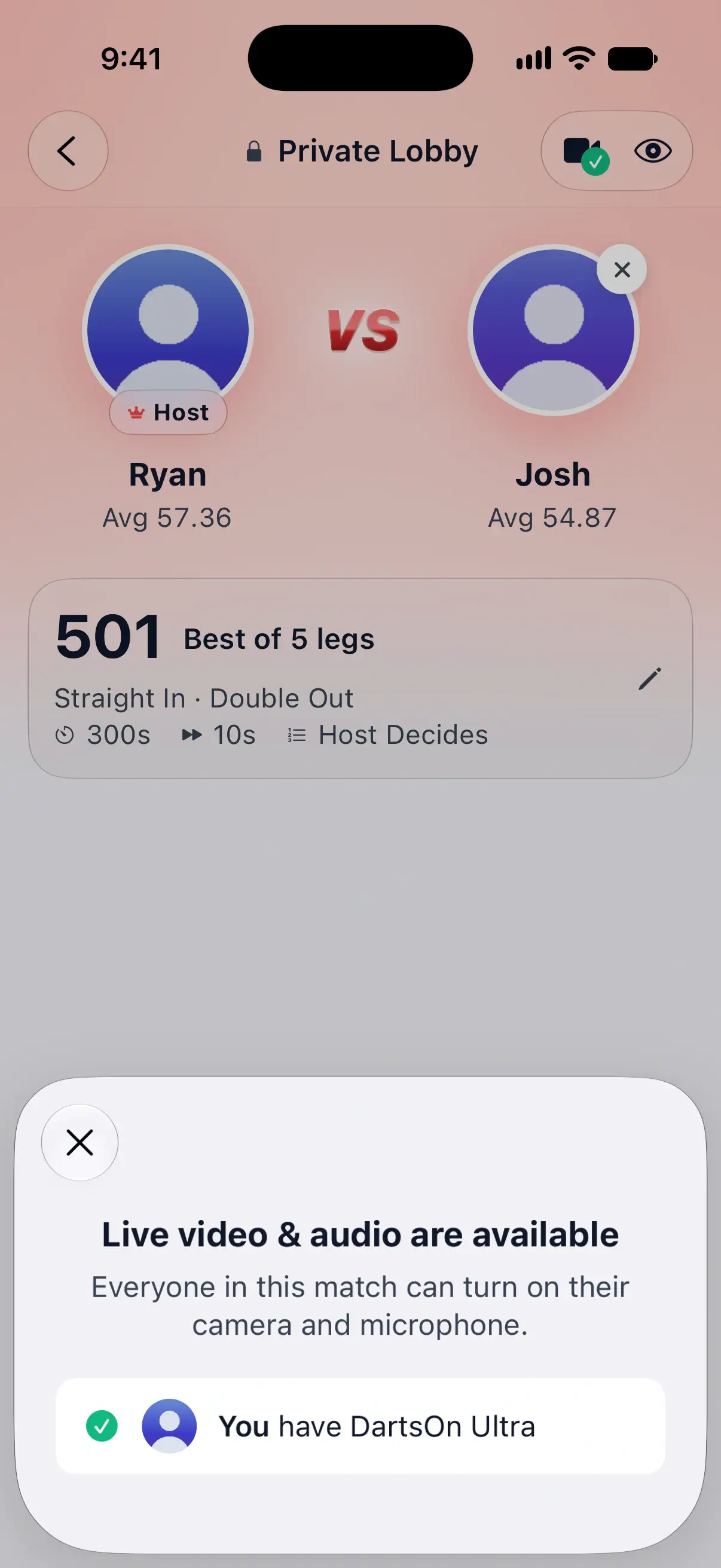

Unlock it in the lobby
The camera button at the top right of the lobby shows a padlock while live video and audio are locked, and a checkmark once they’re available. Tap it to see where the lobby stands.
While it reads Live video & audio are locked:
- Get Ultra opens the Ultra plans. Once you have Ultra, every lobby you sit in is unlocked.
- Use a live match pass appears if you have Premium and a pass left this month. The line under it shows how many you have left. The pass is used only when the match starts, and it covers the rematches in the same lobby.
When it reads Live video & audio are available, the sheet names who unlocked it, such as Megan has DartsOn Ultra. If you chose a pass and change your mind before the match starts, tap Don’t use my pass.
The match keeps what the lobby had when it started. If nobody unlocked it, the camera and microphone controls in the match carry a padlock, and tapping them says live video or live audio needs a player in the match with DartsOn Ultra.
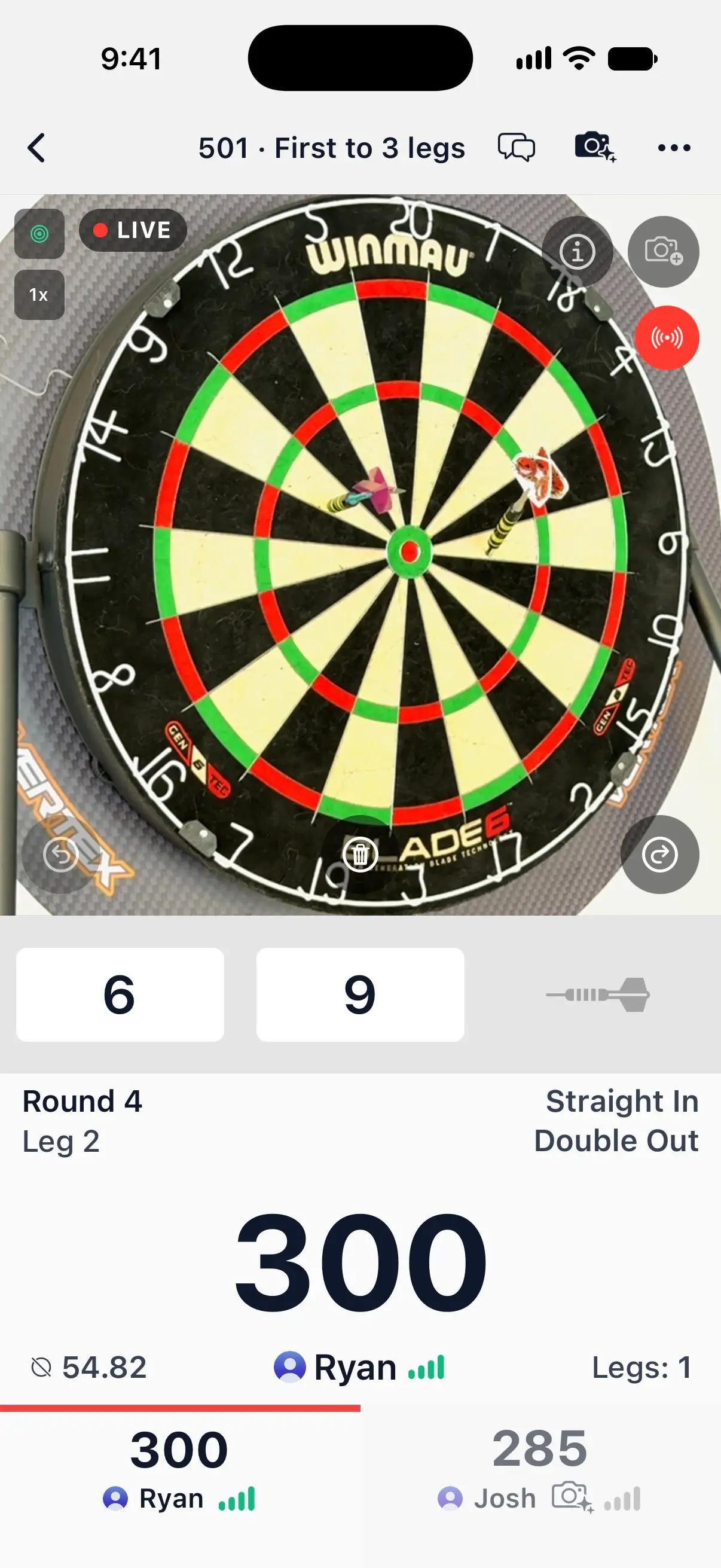
Share your camera
- Start camera auto-scoring with the camera button at the top of the match.
- Tap the share button beside the torch on the camera view, or open the … menu and choose Share Camera.
DartsOn confirms with Your opponent and anyone watching now see your camera live while you throw. A LIVE badge sits on your camera view while it’s being sent.
Your camera sends video during your own turns. Until it has found the board, the other player sees a covered picture asking you to point the camera at the board. The same happens if the board goes out of view. Between your turns, video pauses. DartsOn remembers your sharing choice for the next match. To stop, tap the share button again or choose Stop Sharing Camera.
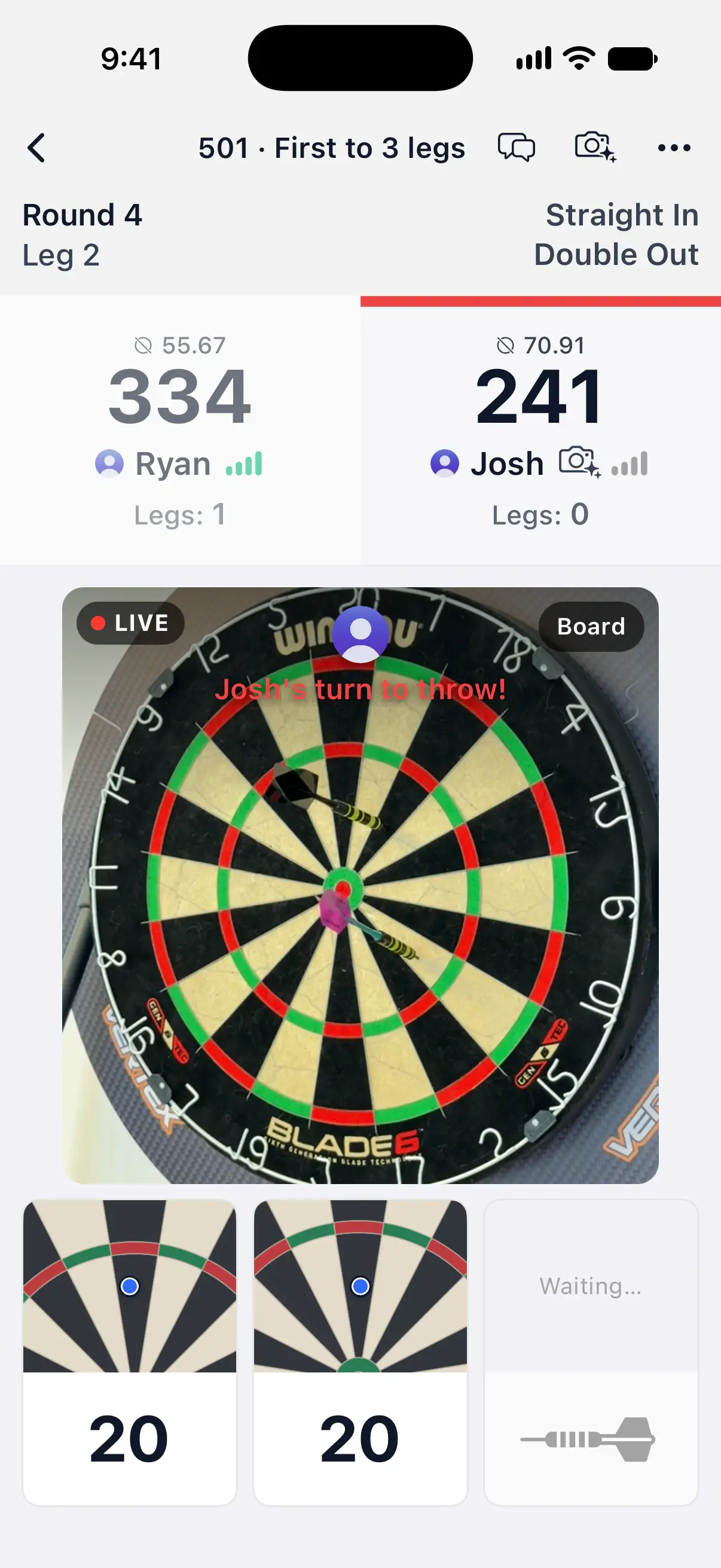
Watch your opponent’s camera
During your opponent’s turn, their live camera takes the place of the drawn board, above their darts. If you use camera auto-scoring on a phone in portrait, it appears in the same place as your own camera view. Between visits or while their feed reconnects, the last picture can stay dimmed with a spinner. A player who isn’t sharing still shows the drawn board.
Tap the camera button at the top right of the picture to switch between the live camera and the drawn board. DartsOn remembers your choice.
If your phone gets too hot, Live camera paused explains that sharing will resume once it cools. Auto-scoring keeps working, and you can still stop sharing from the match menu.
Use your microphone
Your microphone is off when every match starts.
- Tap the microphone button at the top of the match. The first time, your phone asks for permission to use the microphone.
- Talk. The button is red while your opponent can hear you.
- Tap it again to turn the microphone off.
You hear your opponent through your phone’s speaker. To silence them on your phone, open the … menu and choose Mute Players. Unmute Players brings them back.
Choose what spectators get
The host decides what people watching the match see and hear. In the lobby, tap the eye button at the top right to open Spectators:
| Option | What it does |
|---|---|
| Allow Spectators | On by default. Off, only the players see the match. |
| Spectators See Live Camera | On by default. Off, spectators see the drawn board only. |
| Spectators Hear Microphones | Off by default, so only the players hear each other. |
Guests see the same options and can’t change them. A new lobby starts with what you chose last time.
Questions and answers
Do both players need DartsOn Ultra for live video and audio?
No. One player with DartsOn Ultra unlocks live video and audio for everyone in the lobby. A player with Premium can use a live match pass instead.
Is my camera on for the whole match?
No. Nothing is sent until you turn on Share Camera, and then your camera is live only during your own turns, once it has found the board. Your microphone is off at the start of every match.
Can spectators see my camera and hear my microphone?
The host decides in the lobby. By default spectators see the players' live cameras and don't hear their microphones.
Why is live video locked in my match?
Nobody in the match had DartsOn Ultra or used a live match pass when it started. Unlock it in the lobby before the next match starts.
Related
- How to play an online darts match in DartsOn Score an online darts match with the keypad, dartboard or camera, correct a dart, reconnect after a dropped connection, end a match or ask for a rematch.
- Play a private online darts match with a friend Create a DartsOn match, challenge a friend or share its code or link, set the rules in the lobby and start. Also covers join errors and the weekly limit.
- Watch your friends' online darts matches live Follow a friend's online darts match dart by dart in DartsOn, watch public matches from the Global Lobby and see who else is watching.
- What DartsOn Premium and Ultra include and how to get them See what's free in DartsOn, what Premium adds and what Ultra adds on top. Buy a plan in the App Store or Google Play, upgrade, restore a purchase, or cancel.
- Play darts online | DartsOn Online Play darts online with live scores, camera auto-scoring, live video and audio. Challenge anyone to 501, Cricket, Killer and more on your own dartboards.